

For years, the standard playbook for lead generation was simple: buy a massive database of contacts, export thousands of emails, and launch a broadcast. In 2026, teams report diminishing returns from this approach.
According to our The State of Sales on LinkedIn for 2026 report, “Targeting the right prospects” is the number one challenge cited by sales professionals. The issue isn’t a lack of data; it is a lack of good data. Static databases decay quickly data. Static databases decay quickly as people change roles and domains. If you buy lists, a portion may be outdated—leading to bounces, possible deliverability issues, and wasted outreach.
Teams are shifting to live enrichmentTeams are shifting to live enrichment: build a precise lead set first, then find emails for those profiles. Instead of buying a stale list, top performers use PhantomBuster Email Discovery to find professional email addresses directly from LinkedIn profiles. This guide shows how to target active prospects from LinkedIn and spend email discovery credits only on those leads to reduce bounces and improve reply rates.
The problem with “database” prospecting
When you rely on tools that serve static data, you often pay for volume you don’t need. You might get 10,000 emails, but if only 500 are relevant to your current Sales Navigator searches, the rest is noise.
Broad lists make meaningful personalization hard. Generic messages produce lower reply rates—our 2026 study found that personalized outreach generates significantly higher engagement. To achieve the reply rates seen by top performers, you need deep context from live profiles.
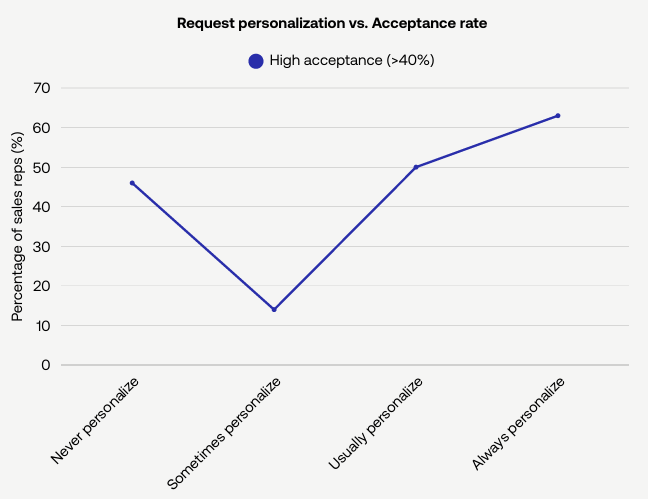
Data from our 2025 research shows that personalized messages earned higher acceptance rates than generic templates.
The PhantomBuster solution: Extract, filter, enrich
Start with fit (Sales Navigator filters), then find emails for that short list. Instead of starting with emails, you start with relevance. You find the exact event attendees or Sales Navigator leads who fit your Ideal Customer Profile (ICP), and then you spend your budget to find their emails.
This helps you spend email discovery credits only on high-value prospects.
As our Product Expert Nathan Guillaumin notes, Sales Navigator filters (such as “changed jobs in 90 days” or “posted in the last 30 days”) produce more precise lists than basic LinkedIn search. These advanced filters let you combine job changes, engagement signals, and company attributes—capabilities unavailable in standard LinkedIn search.
Combining Sales Navigator filters with Email Discovery concentrates spend on in-scope prospects, which can improve conversion rates.
Step 1: Identify and filter
Start with a precise Sales Navigator search. Use LinkedIn Sales Navigator to build a highly specific search.
- Filter: “Marketing Directors in SaaS who posted in the last 30 days.”
- Action: Use the Sales Navigator Search Export automation to extract the profile data into a Google Spreadsheet.
Step 2: Live enrichment
Now, you turn that list of names into a contact list. Configure the LinkedIn Profile Scraper automation.
- Setup: Paste your search URL or CSV file.
- Enrichment: Check the box to enable Email Discovery.
PhantomBuster runs in the cloud. When you enable the built-in Email Discovery during the run, it extracts the name and company from each profile, tests common email patterns (firstname.lastname@company.com, etc.), and performs MX/SMTP checks to reduce bounces and improve deliverability.
Use PhantomBuster’s Email Discovery (credits included), or connect an external provider (Dropcontact, Hunter, Snov.io) via API key from the same run—no extra steps in your workflow.
Step 3: Activation
Once your CSV contains verified emails and company info, you’re ready to launch your outreach sequence.
Activate the workflow as an integrated sequence:
- Run the LinkedIn Profile Scraper automation to extract profile data and find emails.
- Use the LinkedIn Auto Connect automation to send personalized connection requests based on profile context.
- Export your CSV to email platforms like lemlist or sync directly to your CRM to launch email campaigns.
- Use the AI LinkedIn Message Writer automation to draft personalized follow-up messages using the extracted LinkedIn data.
The result: qualified replies, booked meetings, and a pipeline built on relevant, timely context.
Cost analysis: Credits vs. subscriptions
With a standard database subscription, you pay a high monthly fee for access to millions of records you will never use. PhantomBuster includes monthly Email Discovery credits.
You can allocate these credits exactly where they are needed. If you need to enrich leads from a specific conference, you spend your credits there. If you need to focus on leads from a competitor’s audience, you shift your focus. You are not locked into a static asset.
Safety and reliability
A common concern with data extraction is account safety. PhantomBuster runs in the cloud, so actions don’t rely on your local browser session. The automation executes on our servers, not on your local machine.
We provide execution guidelines to help you operate within safe ranges. For example, we recommend limiting profile visits and connection requests to daily thresholds that reduce risk. See our help documentation for current best-practice limits specific to each automation.
Conclusion: Quality over quantity
Large static lists underperform compared to smaller, targeted lists. In 2026, a list of 100 highly relevant, enriched leads with verified emails and context is worth more than 1,000 cold names.
By using PhantomBuster Email Discovery, you cut the waste out of your lead generation budget. You get contact data that is fresh, accurate, and ready for personalized messages.
FAQ: PhantomBuster Email Discovery
How does PhantomBuster Email Discovery work?
During a run of the LinkedIn Profile Scraper automation, Email Discovery combines the full name and company name from the profile, tests common email patterns (e.g., firstname.lastname@company.com), and validates addresses via MX/SMTP checks. Verified results help improve deliverability.
Do I need a separate subscription for Email Discovery?
No. Paid plans include monthly Email Discovery credits. You can see current credit allowances on the pricing page. If you already have an account with another provider, you can also integrate third-party services like Dropcontact or Hunter using an API key.
Is using the Email Discovery service safe for my LinkedIn account?
PhantomBuster is designed with account safety in mind. Automations run in the cloud—actions don’t originate from your local browser. Follow our execution limits (such as daily profile visit caps and connection request limits) to reduce risk. We provide guidance on usage limits so you can operate within LinkedIn’s boundaries.
Can I find emails for people I am not connected to?
You don’t need to be connected. If you can view the profile when logged in—and you respect LinkedIn’s terms—PhantomBuster can extract the name and company data to run Email Discovery. This makes it suitable for outreach to potential customers.
How accurate is the data?
Email Discovery returns a verification status after MX/SMTP checks. Because the input data (current job and company) comes from the live LinkedIn profile, you’re less likely to email someone at a job they left months or years ago, which is a common problem with static databases.
What do I need to start?
To start, you need a PhantomBuster account, a LinkedIn account, and a search source. You can provide a search URL from LinkedIn or Sales Navigator, or a Google Spreadsheet containing profile URLs. Install the PhantomBuster browser extension once to capture your session cookie; runs still execute in the cloud.
Can I export the data to my CRM?
Yes. Once the data extraction and enrichment are complete, you can download the results as a CSV file. You can also use native integrations (where available) or connect via Zapier or Make to sync lead data directly to platforms like HubSpot, Salesforce, or Pipedrive. This makes it easy to move from extracting data to launching campaigns.
What if I run out of credits?
If you use all your Email Discovery credits, the automation will continue to extract profile data but won’t return new emails. You can wait for your monthly credit renewal or upgrade your plan. Check the current credits policy for options.
Try PhantomBuster with Email Discovery to focus credits on in-scope leads. Start your 14-day trial.