
LinkedIn automation is a strange space: most sellers depend on it, yet many still worry that it might put their LinkedIn account at risk. Our State of Sales on LinkedIn for 2026 report captured this tension clearly.
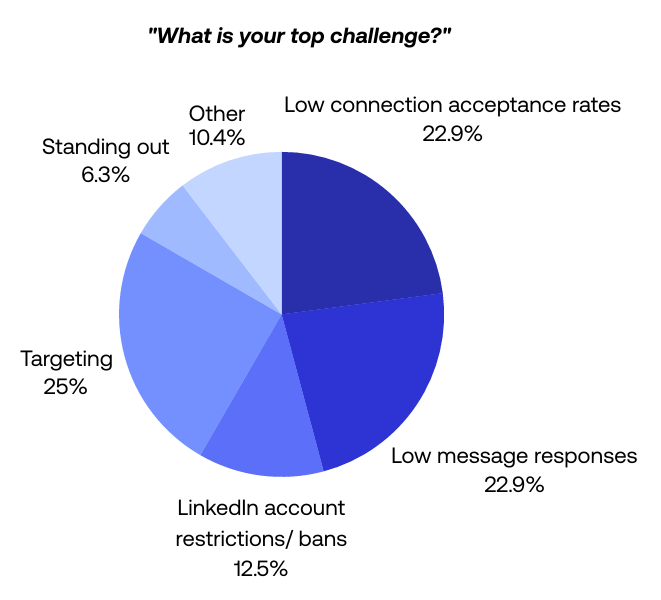
When asked about their biggest challenges, 12.5% of sellers mentioned account restrictions or bans. That’s meaningful, but it’s far lower than the challenges that dominate their day-to-day work, like targeting (25%), low connection acceptance rates (22.9%), and low message replies (22.9%).
Restrictions aren’t constant, but uncertainty around LinkedIn’s evaluation inflates risk perception far beyond the actual frequency of enforcement.
This article reduces that uncertainty and gives you a safer way to operate. Using proprietary data, user behavior patterns from our LinkedIn disconnect analysis, and workflows from top-performing LinkedIn sellers in our dataset, we’ll answer the question:
Is PhantomBuster safe for LinkedIn automation? And more importantly: How do you maintain account safety while automating LinkedIn outreach?
Only 12.5% of sellers see LinkedIn bans as their top challenge, yet confusion about what LinkedIn detects fuels “ban anxiety”
In our 2026 report, only 12.5% of respondents selected restrictions or bans as their top challenge—far below targeting (25%), low connection acceptance (22.9%), and low replies (22.9%). Yet sellers worry about losing their LinkedIn accounts far more than they actually face enforcement issues.
Why? Because LinkedIn never publicly explains how it evaluates automated behavior. That creates a vacuum of uncertainty, which leads many sellers to assume:
“LinkedIn restricts accounts because they use a LinkedIn automation tool.”
This “ban anxiety” often prevents sales teams from scaling their outreach. However, our behavioral analysis of user workflows suggests that safety isn’t about if you use automation, but how consistent you are.
LinkedIn does not just detect tools. It also detects behavioral anomalies.
Most users assume they get restricted because they hit a specific threshold (e.g., “I sent 101 requests instead of 100”). Our technical analysis of 10 months of disconnect data (detailed in our LinkedIn Disconnects Analysis) tells a different story.
We found that forced disconnections are rarely random. They follow a specific behavioral pattern—we call this pattern “slide and spike”: a gradual decline followed by a compensating surge.
- The slide: First, an account sees a gradual decline in activity (median change of about -1.16 launches per day—successful automation runs—over a week).
- The spike: Users often notice the drop and compensate with a manual surge (median +120% increase vs. prior 7-day baseline) to “catch up.”
- The result: This spike likely signals unusual behavior and correlates with higher disconnection rates in our dataset.
The insight: LinkedIn penalizes inconsistency. If your automation pauses or slows down, do not try to make up for lost time by doubling your volume the next day.
How to maintain account safety by avoiding these behavioral flags
Treat your LinkedIn account like a marathon runner, not a sprinter. Keep daily swings within ±15% of your 7-day average to maintain a natural, consistent rhythm. Always follow LinkedIn’s User Agreement and respect recipient preferences.
The workflow:
- Use repeated launches: Schedule your automation to run at spaced intervals (e.g., 3–4 times per day, such as 10:15, 12:45, 15:30, and 17:40 with ±10-minute jitter) instead of manual one-off launches.
- Don’t “catch up”: If you miss a day due to a holiday or error, do not double your limits the next day. Resume your standard pace.
- The “refresh and reset”: If you notice your successful launches declining (the slide), stop. Manually log out and log back in to generate a fresh session cookie, wait 24 hours, then restart at ~50% of prior daily volume and ramp back over 3–5 days.
High-volume, low-relevance outreach is the pattern most likely to trigger restrictions, and our data proves it
While the “slide and spike” triggers technical disconnects, aggressive volume triggers user reports.
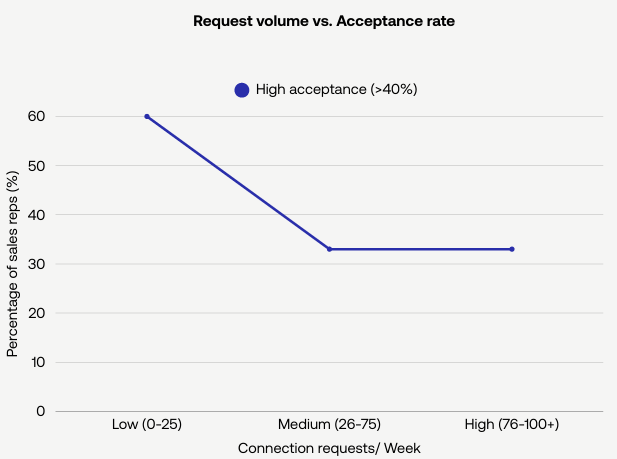
Our 2026 report found that sales reps who send fewer than 25 connection requests per week show acceptance rates ≥40% at nearly twice the rate of those sending more than 80 per week. The cohort data controlled for industry and seniority, confirming that volume alone doesn’t drive results.
High-volume outreach is a lose-lose strategy: it flags your account and delivers lower conversion rates.
How to keep high-volume workflows safe using PhantomBuster
Here’s how to set up a safer, relevance-first workflow with PhantomBuster. Instead of encouraging blast tactics, this integrated approach keeps you within natural behavioral limits:
- Extract a targeted list: Use the LinkedIn Search Export automation to pull prospects matching your ICP from LinkedIn searches.
- Enrich profile data: Export to Google Sheets and add custom fields (intent signals, recent posts, role changes) to personalize your messaging.
- Warm prospects first: Within the same PhantomBuster workflow, add a warming step—profile visits followed by post likes—before the connection request to build familiarity.
- Send personalized messages: Use message templates with variables (first_name, company) and schedule windows (e.g., 9am–5pm local time) to space sends naturally.
- Pace with daily caps: Each step uses scheduling and daily quotas so activity mimics natural patterns rather than robotic bursts.
Inconsistent manual activity is actually more dangerous than controlled cloud-based automation
One of the more surprising findings in our 2026 report is how unpredictable manual behavior is.
Sellers who work manually often:
- Send no connection requests for days.
- Then suddenly send 40 in one burst.
- Jump between mobile, laptop, browser extensions, and CRM plugins.
- Forget to personalize messages.
- Forget to track acceptance rate or cadence.
This creates the exact behavioral footprint LinkedIn considers suspicious.
In our data, inconsistent manual bursts correlated with more disconnects than steady cloud-run workflows of similar volume.
By contrast, PhantomBuster’s cloud execution:
- Runs from managed cloud infrastructure to avoid device-switching patterns. to avoid device-switching patterns.
- Spaces actions using randomized, human-like delays.
- Maintains workflow consistency.
- Removes device-switching anomalies.
- Applies predictable schedules.
Risk increases with inconsistency and irrelevance—regardless of manual or automated execution.
How to transition safely from manual outreach to workflow automation
To maintain account safety when moving from manual work to cloud-based automation:
- Start at 25–40 connection requests per week.
- Use PhantomBuster to extract profile data and build personalized outreach lists.
- Automate repetitive tasks such as profile viewing or data collection.
- Keep your device usage consistent; let cloud execution handle the work.
- Track your acceptance rate; aim for 40%+ before scaling to 40–100 requests per week after 2–3 weeks of consistent performance.
The more predictable your workflow becomes, the safer your LinkedIn account is.
Most “restrictions” are not bans, they’re session cookie disconnects or pattern throttles
Our LinkedIn Disconnects Analysis revealed something sales teams rarely realize:
In our analysis, expired session cookies explained a large share of disconnects; direct automation detection was less common.
We saw that reducing volume didn’t always fix the problem…LinkedIn is recognizing a specific behavioral pattern as opposed to just a hard limit.
Brian Moran, PhantomBuster Product Expert (from LinkedIn Disconnects Analysis, 2025)
These aren’t permanent bans. We also see them on fully manual accounts that experience natural session expirations.
How to prevent disconnects when using a cloud-based automation tool
- Always update your session cookie when prompted (LinkedIn expires them regularly).
- Avoid switching between multiple automation tools.
- Don’t mix heavy extension-based data extraction with cloud execution.
- Avoid rapid cross-platform jumps (mobile → VPN → extension → cloud → mobile).
- Keep activity patterns steady.
This is how you maintain account safety while running LinkedIn workflows across multiple platforms.
Relevance is the strongest practical safety signal on LinkedIn and automation helps you maintain it at scale
Ultimately, the most dangerous threat to your account is a human clicking “Report Spam.”
Our survey identified “Targeting the right prospects” as the #1 challenge for sales teams. If you automate outreach to the wrong people, they will flag you. If enough people flag you, LinkedIn will restrict your account regardless of your technical setup.
One of the strongest data points in our report (representing sellers who consistently apply at least one custom first line referencing recipient context):
Sellers who personalize their connection requestsSellers who personalize their connection requests are 4–5× more likely to achieve acceptance rates ≥40%.
Another:
Sellers with complete, credibility-rich profiles (headline, photo, proof points) were 2× more likely to reach ≥40% acceptance.
Relevance is the strongest practical safety signal we observe, and automation helps you maintain it at scale.
How to build relevance into your LinkedIn automation workflows
Here’s an end-to-end workflow using PhantomBuster to ensure every prospect you contact matches your ICP and receives personalized outreach:
Step 1: Extract a raw list
Use the Sales Navigator Search Export automation to pull prospects from your saved searches. This gives you profile URLs and basic fields.
Step 2: Enrich for personalization
Run the list through the LinkedIn Profile Scraper automation to extract profile fields (recent posts, job changes, shared topics) available to your account. Export the results to Google Sheets and add custom enrichment fields for scoring intent signals.
Step 3: Filter to ICP
Filter in Google Sheets using formulas (e.g., match job title keywords) or use in-app CSV filters to remove anyone whose profile doesn’t match your Ideal Customer Profile before feeding the list to your outreach automation.
Step 4: Connect with context
Only feed the verified, enriched list into your connection request automation. Use the custom fields to build personalized messages that reference meaningful context. By ensuring high relevance, you minimize the risk of negative user feedback.
Most restrictions are preventable: Here’s your safe operating range
To give sellers clarity (and remove the anxiety), we consolidated data from the report, user behavior patterns, and LinkedIn’s observed thresholds into a simple table:
Safe ranges for LinkedIn automation
| Activity type | Safe range | Why it matters |
|---|---|---|
| Connection requests | ~40–100 per week (warmed accounts with >30 days of consistent activity); new accounts should start at 20–40/week | Matches natural human activity and supports high acceptance rates |
| InMails/DMs | Keep under ~20 per day and vary timing | Prevents repetitive message patterns LinkedIn flags |
| Profile visits & likes | Spread across the day using scheduling windows (e.g., 9am–5pm local) with randomized delays | Avoids suspicious clustered behavior |
| Outreach days | 3–5 days/week | Keeps weekly rhythm consistent and avoids weekend spikes when recipients are inactive |
| Personalization | At least 1 contextual line | Drives acceptance and reduces negative signals |
These aren’t PhantomBuster limits—they’re LinkedIn-safe behavioral patterns, validated by our analysis and customer workflows.
How PhantomBuster enforces these limits automatically
PhantomBuster provides built-in controls to help you stay within these ranges:
- Daily quotas and randomized delays: Set maximum actions per day and let the scheduler space them naturally.
- Cloud execution: Runs from managed infrastructure to avoid device/IP hopping patterns that trigger flags.
- Scheduler windows: Spread actions across working hours (e.g., 9am–5pm in recipient time zones) instead of clustering them.
- CSV and field filters: Target your ICP by filtering on title, industry, and keywords before launching outreach.
- Cloud-based execution: Avoids browser extension fingerprinting risks by running independently of your local device.
This is how you maintain account safety while using a cloud-based automation platform.
Conclusion: Safe automation, measurable gains
In our 2026 dataset, sellers operating within the ranges above saw higher acceptance rates and fewer disconnects than those relying on high-volume bursts. PhantomBuster provides scheduling, daily quotas, and ready-made workflows to run this approach consistently.
If you want to increase meetings booked while managing risk, the next step is to test it in your own environment. Start your free 14-day trial with PhantomBuster and see how consistent, intent-driven automation impacts your acceptance rates, reply rates, and disconnects.
FAQ
Is PhantomBuster safe for LinkedIn automation?
Yes—when you stay within natural behavioral limits and keep activity consistent, PhantomBuster runs safely. Restrictions occur when users send large bursts of identical actions or switch between devices excessively, not because a cloud-based automation tool is in use.
What does LinkedIn actually detect?
LinkedIn focuses on behavioral anomalies: rapid spikes in connection requests, identical messages sent at high volume, device/IP inconsistencies, or repetitive activity patterns. Browser extensions may create detectable patterns; cloud execution reduces that risk. PhantomBuster’s cloud execution and pacing features help avoid those patterns.
What are the recommended daily limits?
To maintain account safety, we recommend processing up to ~80 profiles per day (viewing or extracting data) on warmed accounts; start lower on new accounts. Send roughly 20 connection requests per day. Consistency is more important than hitting the maximum limit every day.
Are most LinkedIn “bans” real bans?
No. Most are session cookie expirations or temporary restrictionsNo. Most are session cookie expirations or temporary restrictions. We also see these on fully manual accounts. Updating your session cookie and keeping a consistent workflow typically resolves the issue.
How many connection requests can I safely send?
Our data suggests that 40–100 personalized connection requests per week is safe for warmed LinkedIn accounts (those with >30 days of consistent activity). New accounts should start at 20–40 per week. LinkedIn responds positively to relevance and consistency, not volume alone.
What should I do if my session disconnects?
Do not panic and do not immediately relaunch with higher volume. Manually log out of LinkedIn on your desktop, log back in to generate a fresh cookie, wait 24 hours, and then restart your automation at ~50% of prior daily volume. Ramp back to full capacity over 3–5 days.
Does automation improve results without increasing risk?
Yes. Automation users book more meetings than manual users because they maintain better targeting and stay consistent. Safe automation is more predictable, and LinkedIn rewards predictability.