
Our December 2025 study shows most LinkedIn sellers use some form of automation. That’s why your edge now comes from how you use it, not whether you use it. According to our The State of Sales on LinkedIn for 2026 report, many sellers use tools to send mass connection requests while their results decline.
One B2B SaaS founder put it plainly in our survey:
There is a lot of noise, many people and companies prospecting, how to stand out is the key element.
Top performers don’t debate whether to automate—they focus on how to automate responsibly. This guide covers the essential automation dos and don’ts for LinkedIn sellers, helping you work within LinkedIn’s limits and use PhantomBuster to build a consistent presence that leads to more replies and meetings.
The “safety first” approach: Tools and infrastructure
Automation carries risk. Keep daily actions low, avoid simultaneous sessions, and stop if you receive warnings.
A common risk is temporary account restrictions. This usually happens not because you are automating, but because you are automating badly.
Don’t: Use browser extensions
Many sellers use browser extensions to extract data or send LinkedIn messages. This is a critical error.
Many extensions execute actions in-page, which can leave detectable patterns (e.g., bursty speeds, identical intervals). Those patterns increase restriction risk.
Do: Use cloud-based automation with PhantomBuster
To reduce risk and keep work off your browser, run automations in the cloud. PhantomBuster runs automations in the cloud and lets you use a consistent IP location so actions don’t originate from your browser.
It runs independently of your browser, so your workflows continue on schedule and you reduce manual effort and risk.
The strategy: Connection vs. conversation
Many professionals view automation as a way to blast generic messages to thousands of people. This is the fastest way to destroy your reputation and lower your connection acceptance rates.
Don’t: Rely on native filters alone
One of the common mistakes identified in our survey is trusting LinkedIn’s basic search filters. A North America–based founder noted:
LinkedIn is extremely limited in its ability to screen ICP and the data is less reliable than other sources.
If you automate outreach based solely on a job title search, you will end up pitching to people who changed jobs three months ago or aren’t in your target market.
Do: Enrich and segment before sending
Top sellers use PhantomBuster to extract LinkedIn search results, enrich profiles with recent activity signals, and review segments before messaging. Filter by recent hiring, funding, or posts to prioritize likely buyers.
Here’s the step-by-step workflow:
- Export LinkedIn search results with PhantomBuster
- Enrich with recent activity signals (posted in last 30 days, job change less than 90 days)
- Exclude non-ICP titles, regions, or company sizes
- Segment by trigger: hiring announcements, funding news, tech stack indicators
- Draft message variants per segment with PhantomBuster’s AI LinkedIn Message Writer
- Queue 20–30 per day and review replies daily
This lead generation hygiene prevents you from wasting your daily limits on dead ends.
The messaging: Spam vs. serendipity
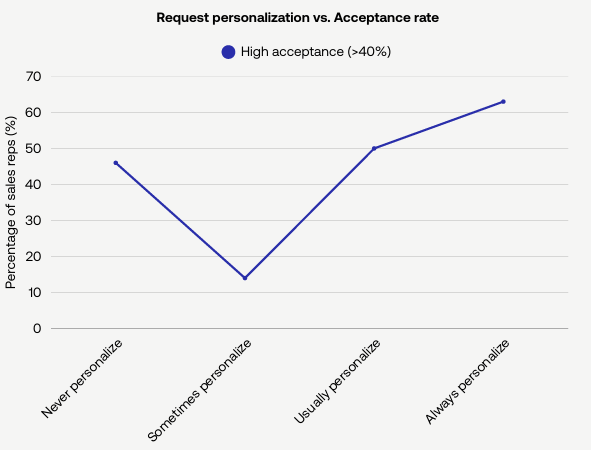
When you automate LinkedIn connections, the message itself matters more than the volume.
Don’t: “Set and forget” generic sequences
Sending the same message to 1,000 people isn’t good automation; it’s digital littering. Response rates for templates like “I saw your profile and wanted to connect” have plummeted to near zero.
Do: Automate “social warming”
Instead of automating the ask, automate the interest.
Use PhantomBuster to view profiles and, if they’ve posted recently, like 1–2 posts per prospect (cap at 20–30 per day). Avoid automating comments—write those manually to maintain authenticity.
This pre-engagement step builds familiarity before you reach out. When the request finally arrives, it feels like a natural step in a relationship, not a cold sales pitch.
Comparison: High-risk habits vs. strategic workflow (with PhantomBuster automations)
To visualize the difference in approach, here is how a “Lazy Automator” compares to a top-performing “Strategic Automator.”
| Feature | The lazy automator (don’t) | The strategic automator (do) |
|---|---|---|
| Tool type | Browser extension (higher risk) | Cloud-based PhantomBuster automation (lower risk) |
| Targeting | Broad keyword search | Enriched, cleaned data |
| Outreach volume | 100/day (high restriction risk) | 20–30/day (steady, lower risk) |
| Message style | “Hi [Name], buy my product.” | “Hi [Name], loved your post on [Topic].” |
| Follow up | Pestering every 24 hours | Value-add content based on triggers |
| Result | Higher chance of restriction | More replies and qualified conversations |
CRM hygiene: The hidden efficiency killer
Perhaps the most overlooked aspect of automation do’s and don’ts for LinkedIn sellers is data management.
Don’t: Manage leads in spreadsheets
If you are manually copying data from LinkedIn to Excel, you are wasting the time you saved by automating your LinkedIn outreach.
Do: Sync automatically
As an account manager in Europe told us, the goal is:
To be automatically synced with Salesforce without our internal coding.
Use PhantomBuster’s CRM Sync automations to push records into HubSpot, Salesforce, or Pipedrive. Map required fields and set a sync cadence so reps see current data without manual copy-paste.
Set your CRM Sync automation to run hourly and dedupe by LinkedIn URL to keep your pipeline clean.
Conclusion: Automation is a force multiplier, not a replacement
Automation handles the repetitive tasks so you can focus on real conversations. By following these guidelines—choosing cloud over browser, warming over blasting, and automated syncing over manual copying—you can build a consistent presence that leads to more qualified conversations.
PhantomBuster provides the automations to run this workflow with lower risk and less manual work. It helps you find prospects, reach out thoughtfully, and manage follow-up while staying within conservative daily limits. In 2026, the sellers who win are the ones who use automation to be more human, not less.
Start your 14-day free trial of PhantomBuster.
FAQ: LinkedIn automation best practices
Is LinkedIn automation allowed in 2026?
LinkedIn prohibits unauthorized automation. Running cloud automations at conservative volumes and human-like pacing reduces (but doesn’t remove) restriction risk. The key is to use automation to mimic manual work at a reasonable pace, not to spam the network.
How many connection requests should I send per day?
To avoid having your account restricted, we recommend sending no more than 20-30 connection requests per day. Consistency is better than bursts. Sending a small number of personalized connection requests daily will yield better results and keep your LinkedIn profile safer compared to sending 100 in one hour.
Can I automate LinkedIn posts?
You can schedule posts to stay consistent. Don’t automate comments—write them manually for relevance and authenticity. Cap scheduled posts at 2–3 per day to maintain a natural presence.
What should I do if my account is flagged?
If you receive a warning, stop all automation immediately. Disconnect any browser extensions.
Pause all automation. When access is restored, restart gradually (single-digit actions at first), monitor warnings, and keep volumes low.
How do I personalize automated messages?
Use PhantomBuster’s AI LinkedIn Message Writer. Instead of inserting just a name, the AI can analyze the prospect’s LinkedIn activity, recent posts, and company news to write a unique message—so your messages reference recent activity and likely pains. Expect higher reply rates than generic templates.
Does PhantomBuster work with Sales Navigator?
PhantomBuster works alongside Sales Navigator. Use Sales Navigator to find leads, then run PhantomBuster automations to extract, enrich, and message with controls.
Why is cloud automation safer than browser extensions?
Browser extensions inject code into the page you are viewing, which LinkedIn’s security systems can detect as unauthorized modifications. Cloud automations don’t run in your browser and can use consistent IPs. That reduces detectable patterns, but nothing is undetectable. Keep volumes conservative.
Can I manage multiple accounts with automation?
Agency teams can manage multiple client accounts in one workspace. Assign a separate login and IP per account and document client consent. Keep each account’s volumes and messaging distinct.