
In 2026, sales teams win or lose on data freshness and accuracy. Our December 2025 edition of The State of Sales on LinkedIn for 2026 shows many teams still operate on outdated records. 40% of sales professionals still update CRMs manually, relying on static spreadsheets rather than enrichment workflows.
This reliance on raw data and manual input creates a “dirty data tax”: wasted hours, bounced emails, and missed opportunities. Inaccurate data increases bounced emails and lowers reply rates, which stalls campaigns early.
Top-performing growth teams are shifting their budgets. They are reallocating spend from expensive static lead lists toward enrichment workflows that keep customer records fresh and actionable. This guide explores why B2B data enrichment delivers outsized ROI in 2026 and how to set up a recurring enrichment workflow with PhantomBuster.
The problem: data decay and the quality gap
Customer data is a perishable asset. People change jobs, companies merge, and contact details evolve. If you rely on existing records that haven’t been touched in six months, you are working with poor data quality. In typical B2B datasets, 12–20% of job roles change within six months.
One founder told us in the December 2025 study:
LinkedIn is extremely limited in its ability to screen ICP and the data is less reliable than other sources.
This limitation forces sales reps to become investigators, wasting hours searching for phone numbers or verifying job titles. This manual work leads to missing data points and CRM enrichment gaps. When sales outreach is based on guesses rather than accurate contact information, the sales team loses credibility and momentum.
Use PhantomBuster for data enrichment
Don’t throw more hours at cleaning. Use an enrichment workflow to update records on a schedule. PhantomBuster automates collecting B2B data from public sources and validates key fields—company domain, role, location—as part of the workflow.
Unlike third-party data providers that sell you a static list, PhantomBuster extracts public prospect data from sources like LinkedIn Sales Navigator, within platform limits and on the schedule you set to enable practical enrichment workflows. This keeps your lead database updated on a recurring schedule.
Nathan Guillaumin, a Product Expert at PhantomBuster, explains how to chain PhantomBuster Automations in one workflow:
You can chain automations together. First run Google Maps Search Exports, then use those results to enrich data through LinkedIn Company Scraper or Facebook Profile Scraper. It’s totally possible to sequence these phantoms.
In PhantomBuster, you can sequence Automations into one workflow. Run Google Maps Search Export to find local businesses, then pass those results to the LinkedIn Company automation to extract public company data, then to the Facebook Profile automation if needed—all within the same PhantomBuster workflow.
This lets you enrich firmographic and contact fields for each target account automatically, then push updates to your CRM.
Set up a weekly enrichment workflow
Here’s how to build a recurring enrichment system:
- Choose your source list (e.g., a LinkedIn Sales Navigator search of your ICP).
- Run the LinkedIn Search Export automation to capture profile URLs.
- Chain the LinkedIn Company automation to pull firmographic data (headcount, industry, location).
- Push enriched records to HubSpot, Salesforce, or Pipedrive via PhantomBuster’s native connectors or Zapier.
- Review weekly; de-duplicate and segment by intent signals (recent role changes, hiring activity).
Audit last quarter’s list purchases; reallocate part of that budget to a weekly enrichment run and measure bounce and reply rate changes over 30 days.
Beyond basic contact info: intent and context
Standard enrichment tools might give you an email address. A good enrichment workflow gives you context. To compete in 2026, you need more than just a way to contact someone; you need to know why you are contacting them now.
PhantomBuster can capture public intent signals—who commented on relevant posts, recent role changes, hiring activity—from publicly available pages, within platform terms.
- Identify: Who is commenting on your competitor’s posts?
- Enrich: Who are the decision makers at companies hiring for your specific service?
- Action: Push enriched data to your CRM via PhantomBuster’s native connectors or Zapier/Make so reps can act the same day.
This turns raw records into prioritized, segmented lists your reps can work. Beyond emails and phones, you get recency signals—new role, recent post activity—to time outreach.
Comparison: static lists vs. dynamic enrichment
Why are teams moving away from traditional data brokers? The economics are clear.
| Feature | Buying static lists | PhantomBuster dynamic enrichment |
|---|---|---|
| Data source | Aged databases | Public profiles on demand |
| Accuracy | High decay rate | Fresh data on a schedule |
| Cost | Expensive per record | Pay per workflow run |
| Depth | Limited data points | Public fields only (company, role, location, recent posts) |
| Integration | Manual upload | Push updates to HubSpot, Salesforce, or Pipedrive via native connectors or Zapier/Make |
The tech stack: integration is key
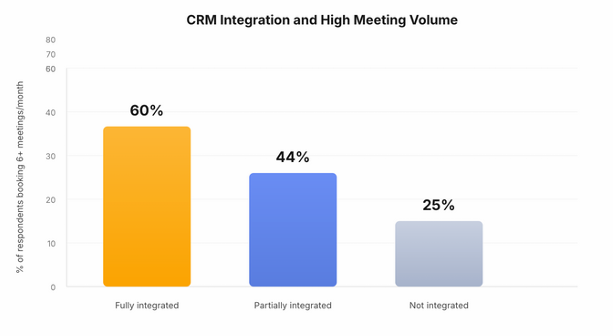
For marketing and sales teams, the value of data is determined by its accessibility. Data loses value when it stays outside the CRM.
PhantomBuster connects to HubSpot, Salesforce, and Pipedrive via native connectors and to other CRMs via Zapier/Make or webhooks. You can set Automations to update CRM records after each run or on a weekly schedule. Automations extract public data from source pages and push updates directly to your CRM.
As one Account Manager in Europe noted in our study, the goal is:
To be automatically synced with Salesforce without our internal coding.
By removing the friction of data cleansing and import, you run outreach campaigns on reliable data, increasing the efficiency of marketing teams and sales reps alike.
Conclusion: accurate data is your competitive advantage
In a world where everyone has access to AI writing tools, the quality of your message doesn’t matter if it lands in a dead inbox. Accurate data is a durable advantage for outbound and ABM.
By switching from manual entry to enrichment workflows with PhantomBuster, you stop paying the “dirty data tax.” Your reps get complete records and recent signals so they can personalize outreach faster—calls, emails, and connection requests rely on current, verifiable fields.
Start now and activate your free trial of PhantomBuster.
FAQ: B2B data enrichment tools
What are data enrichment tools?
Data enrichment tools are software solutions that automatically enhance your existing customer data by adding missing information from external sources. They take basic inputs—like a name or domain—and append data points like email addresses, phone numbers, job titles, and company size, helping you build complete and actionable CRM records.
Why is data accuracy important for sales?
Data accuracy is the foundation of successful sales outreach. If sales reps rely on inaccurate data, they waste time chasing wrong numbers or bounced emails. Reliable data improves deliverability rates and enables better segmentation, which raises reply rates and meeting-booking efficiency for marketing and sales teams.
How does PhantomBuster enrich data?
PhantomBuster runs Automations that fetch public fields from profile and company pages on demand or on a schedule, within platform limits. Unlike third-party data providers that sell static lists, PhantomBuster extracts data from live public sources like LinkedIn, so you get the most current contact info and firmographic data.
Is data enrichment compliant with data laws?
Compliance depends on your use case and jurisdiction. PhantomBuster processes publicly available data; you’re responsible for establishing a lawful basis (e.g., legitimate interests under GDPR) and honoring platform terms. Consult your legal counsel to ensure your workflow meets regulatory requirements.
Can I enrich data for free?
Some tools offer a free plan, but they often have limited data coverage. PhantomBuster offers trials that allow you to test enrichment capabilities. For ongoing workflows, choose a plan that matches your volume.
What is the difference between data cleansing and enrichment?
Data cleansing focuses on fixing errors—removing duplicates, fixing typos, and improving data quality. Data enrichment focuses on adding value—appending missing data points like buyer intent signals or social handles. A comprehensive data strategy requires both.
Does PhantomBuster integrate with my CRM?
Yes. PhantomBuster can push enriched data into HubSpot, Salesforce, and Pipedrive via native connectors; other CRMs connect via Zapier/Make or webhooks. This helps keep your CRM current by updating fields on a recurring schedule.
How does enrichment help with account-based marketing (ABM)?
ABM requires deep insight into company data. Enrichment workflows allow you to map out an entire organization, finding all key stakeholders and decision-makers. By enriching lead data with intent signals—like recent funding, role changes, or hiring activity—you can prioritize outreach windows (e.g., within 14 days of a trigger event).