
In our December 2025 survey, larger unsegmented lead lists correlated with lower reply rates. Shrinking lists to ICP-specific segments improved outcomes. For years, the prevailing wisdom was that a larger funnel equaled more revenue. If you put enough potential leads at the top, something would eventually drop out of the bottom.
According to our State of Sales on LinkedIn 2026 report (December 2025), broad outreach consistently underperforms targeted outreach. The survey data shows that “targeting the right prospects” ranked as the top challenge for 42% of respondents (n=1,146).
When you broaden your lead targeting strategy to cast a wide net, you dilute your message. Generic messages sent to a broader audience result in low conversion rates and account restrictions. This guide shows why broad targeting fails and how to implement a behavioral targeting workflow—with PhantomBuster enabling the data extraction and enrichment steps—so you reach the right accounts and build a sustainable lead-generation strategy.
The cost of noise: Why broad targeting is failing
Decision-makers receive far more LinkedIn messages than they can process. When your outreach efforts rely on basic filters like “Marketing Manager in New York,” you are competing with thousands of other reps using the exact same criteria.
Survey respondents cited limited ICP filtering and data freshness on LinkedIn as key obstacles to effective prospecting. One founder in North America noted that standard LinkedIn search lacks the depth needed to identify true fit.
This limitation leads to wasted effort. You spend time nurturing leads who were never going to buy, while interested prospects get lost in the shuffle. Teams prioritizing lead quality over quantity reported reply rate lifts of 3–5 percentage points and sales cycles that were 10–15% shorter (December 2025 survey data).
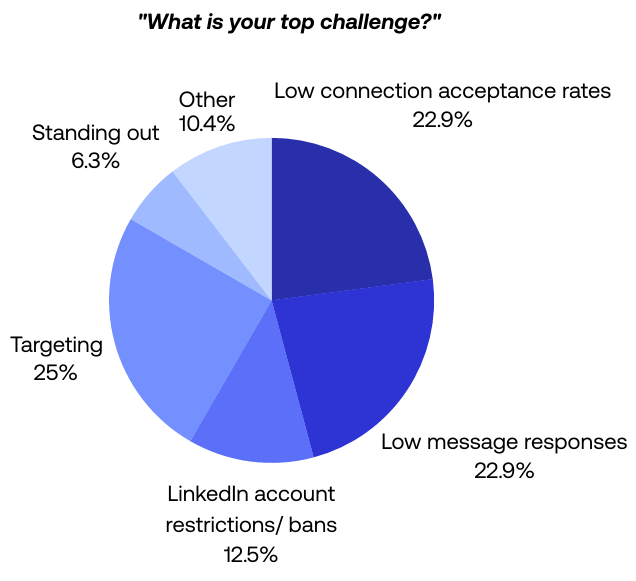
Source: PhantomBuster State of Sales on LinkedIn 2026 (December 2025). Targeting ranked as the top challenge among survey respondents.
How to combine PhantomBuster and Sales Navigator for behavioral targeting
To break the downward trend, move from demographic targeting to behavioral targeting. This requires a workflow that goes deeper than standard LinkedIn search.
Nathan Guillaumin, a PhantomBuster Product Expert, explains why upgrading your tooling is the first step:
“The best will be to use Sales Navigator as the searches are always more precise. You can combine other filters—people who have changed jobs lately, people who posted on LinkedIn, filter based on geography—many things you cannot do on a simple LinkedIn search.”
Use Sales Navigator to seed the list with advanced filters, PhantomBuster to capture engagement signals and extract profile data, and your CRM to prioritize tasks—so reps work warm, intent-driven accounts first. This workflow filters for intent, not just job title.
Step 1: Define the ideal customer profile (ICP)
Before you generate leads, define your ideal customers with precision. This goes beyond “SaaS companies.” Include company size, recent funding, technology stack, hiring patterns, and growth signals.
Step 2: Automated extraction and filtering
Using PhantomBuster’s Sales Navigator Search Export automation, you can extract profiles that match your ICP. Then clean and rank the list. Keep batch sizes within LinkedIn’s limits and pace exports to protect account health.
- Exclude: Remove existing customers or competitors.
- Verify: Check if they are still in the role (LinkedIn data can be stale).
- Prioritize: Rank leads based on recent activity.
The result is a filtered list of high-quality prospects in your target audience.
How do you target by behavior, not just demographics?
The most promising leads are often found not by who they are, but by what they do. Behavior reveals intent. LinkedIn provides signals like recent posts, comments, job changes, and follows that you can act on.
Targeting recent commenters on competitor posts typically outperforms title-only lists. In our dataset, engagement-based lists lifted reply rates by 4–7 percentage points compared to demographic filtering alone.
Use PhantomBuster’s LinkedIn Post Likers Export and LinkedIn Post Commenters Export automations to capture engaged prospects from specific posts, then de-duplicate and score them in your CRM. If a prospect is asking questions on a post about “SEO challenges,” they are signaling active demand. Reference the post topic in your opener and propose one concrete next step (e.g., a two-line suggestion or relevant resource).
How does AI lead scoringHow does AI lead scoring help you prioritize leads?
Once you have a list of leads, how do you know who to call first? In the past, this was guesswork. Today, you can export profile variables (role, tenure, posting recency) and use PhantomBuster’s AI enrichment step to compute a 0–100 score against your ICP rules.
Nathan Guillaumin highlights how PhantomBuster users are applying this:
PhantomBuster’s AI automation helps with lead scoring. You add variables and ask AI to calculate a lead score for each. Some users are doing lead scoring—based on job title, location, what’s written in bio, they give a score from 1 to 100. If above 70, they send to outreach sequence.
With PhantomBuster’s AI enrichment capability, you pass profile fields and return a score with reasoning. Push the result to your CRM to auto-prioritize tasks. This routes high-scoring leads to reps first while lower scores enter a nurture sequence. Human interaction is reserved for qualified leads.
ROI comparison: Spray and pray vs. precision targeting
The impact of a refined lead targeting strategy is measurable. Here is how the two approaches compare based on industry patterns we observe:
| Metric | Broad targeting (spray and pray) | Precision targeting |
|---|---|---|
| Search criteria | Job title + location | Job title + behavioral signals + activity |
| Outreach volume | Undifferentiated bulk sends | Targeted sends paced to LinkedIn’s daily limits and warmed accounts |
| Lead quality | Low (mostly noise) | High (targeted leads) |
| Account safety | Higher risk with volume-first approach | Lower risk when respecting LinkedIn limits (rate caps, warming, realistic pacing), including when using PhantomBuster’s cloud execution |
| Conversion rate | Typically under 3% | Teams commonly see materially higher conversion (8–12% range) with behavioral filtering |
Focusing on qualified leads reduces restriction risk and increases revenue efficiency.
Conclusion: Stop guessing, start targeting
The era of “more is better” is over. In 2026, effective lead generation is defined by lead quality and relevance.
A lead targeting strategy built on broad assumptions is a recipe for burnout. By using PhantomBuster to pull Sales Navigator data and AI to score and prioritize prospects, you can build a pipeline that delivers revenue, not just connection requests.
Define your ICP, capture recent engagers from 3–5 relevant posts, score them, and message the top tier with a problem-specific opener. Start your 14-day free trial with PhantomBuster today.
FAQ: Refining your lead targeting strategy
How do I define a lead targeting strategy for 2026?
An effective lead targeting strategy starts with a granular ideal customer profile (ICP). Move beyond basic demographics like location. Use PhantomBuster to extract profiles with recent job changes or post activity, label them with those signals, then filter in your spreadsheet or CRM. The more specific your criteria, the better your chances of conversion.
Why are targeted leads more valuable than broad leads?
Targeted leads have higher intent to buy. When you focus on a broader audience, you waste resources on people who do not have the pain points your product or service solves. Teams typically see 3–5 percentage point reply rate increases and lower customer acquisition costs when lists are behavior-filtered versus title-only.
Can PhantomBuster help me find leads who are active on LinkedIn?
Yes. Use PhantomBuster’s LinkedIn Post Likers Export and LinkedIn Post Commenters Export automations to capture recent engagers on specific posts. These lists often warm up outreach because the prospects are already active on the topic, making your outreach efforts more relevant.
How does AI improve lead scoring?
AI can analyze unstructured data, like a LinkedIn bio or recent posts, to determine fit. Instead of manually reading 1,000 profiles, you can use PhantomBuster’s AI enrichment to assign a score (0–100) to each lead based on your ICP. This allows your sales team to focus on the most promising leads first.
Is buying lead lists a good strategy?
Generally, no. When you buy leads from static databases, the data is often outdated or non-compliant. It is far more effective to generate your own fresh lists using Sales Navigator and PhantomBuster. This ensures the data is current and allows you to own the lead capture process from the start.
What is the best way to target decision makers?
To target decision makers, use Sales Navigator’s seniority filters combined with PhantomBuster’s enrichment capabilities. Look for job titles like “Head of,” “Director,” or “VP.” Additionally, look for triggers like “hiring for sales” or “recent funding,” which indicate budget authority and urgent needs.
How do I re-engage cold leads?
Re-engage leads by monitoring their activity. Use PhantomBuster’s LinkedIn Activity Watcher automation to track when leads post new content. Set conservative daily caps, randomize timing, and prioritize genuine comments over automated likes. Always personalize messages referencing their recent activity and respect LinkedIn’s rules. This “social warming” tactic can resurrect cold leads by providing value rather than just asking for a meeting.
Does content marketing help with lead targeting?
Yes. By publishing valuable content or lead magnets (like whitepapers or free trials) on LinkedIn, you attract interested prospects. You can then use PhantomBuster to extract profiles of people who engaged with that content (within rate limits and terms), then de-duplicate and enrich before outreach, creating a list of warm leads for your targeting strategy.