

If you have ever spent 30 minutes copying LinkedIn profiles into your CRM, you already know the cost.
Now scale that across dozens of prospects, multiple reps, and an entire quarter. What looks like busywork quietly slows pipeline movement and distorts reporting.
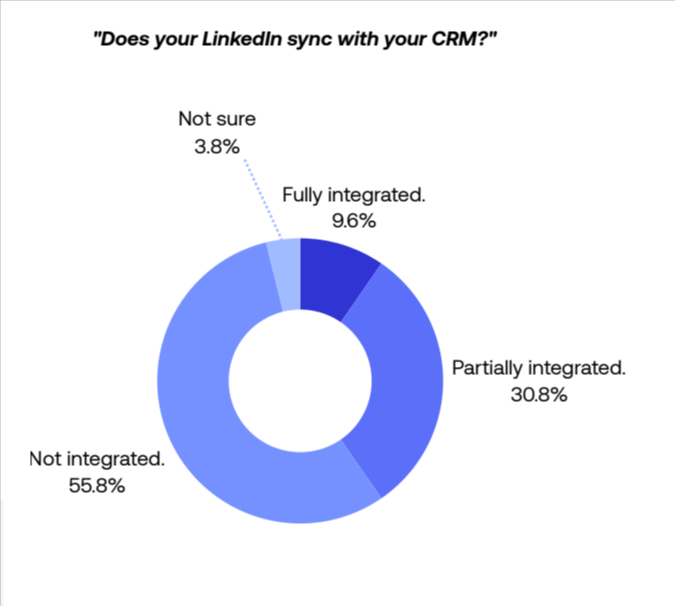
Data hygiene often predicts whether reps can reliably track pipeline and forecast. Teams with consistent data maintenance close gaps faster. In our latest report, “The State of Sales on LinkedIn for 2026,” our study (n=104 B2B sales professionals) found a common pattern: 56% of reps still update CRMs by hand, which slows pipeline updates and creates visibility gaps.
While marketing teams have largely automated their funnels, many sales professionals still copy-paste data between LinkedIn and the CRM. The report shows that administrative drag is preventing teams from meeting reply-rate and meetings-booked targets.
Below, we analyze the specific data points on CRM usage from our study and explain how PhantomBuster’s LinkedIn-to-CRM pipeline reduces manual updates by syncing enriched profile data into mapped CRM fields.
Quick summary: a practical LinkedIn-to-CRM data flow
| Challenge | The “Old Way” | The Automated Workflow |
|---|---|---|
| Data Entry | Copy-pasting profiles one by one | PhantomBuster – LinkedIn Search Export automation → CRM/Sheets |
| Enrichment | Guessing emails or manual research | PhantomBuster – LinkedIn Profile Scraper automation + email discovery (e.g., Dropcontact) |
| Targeting | Inaccurate, decaying lists | PhantomBuster – Sales Navigator Search Export (fresh data) |
| CRM Hygiene | Duplicate records and typos | PhantomBuster – CRM Enricher (HubSpot/Salesforce/Pipedrive) auto-mapping |
What the data reveals: six CRM issues slowing sales efficiency
Below, we break down six issues from the study and show you how to automate each one.
1. 56% of sales professionals still update their CRM manually
This was one of the most significant findings in the study. Over half of respondents either update their CRM by hand or skip updates entirely. In fact, only 10% report end-to-end syncing between LinkedIn prospecting and CRM records (contacts and activities), showing a disconnect between conversations on LinkedIn and the pipeline in the CRM.
When sales reps have to manually input job titles, company names, and email addresses for every lead, two things happen:
- they spend less time selling,
- and they eventually stop entering new data altogether, leading to poor contact data quality.
One sales manager in Financial Services asked for “automatic Salesforce syncing without internal coding.”
How to build a “search-to-CRM” pipeline
You can solve this without engineering resources. A simple search export isn’t enough; you need to enrich the data first.
The workflow:
Extract: Use PhantomBuster’s LinkedIn Search Export automation (Sales Navigator Search Export for deeper filters) to process up to ~1,000 search results per day (up to ~2,500 with Sales Navigator, depending on account health and platform risk). This pulls public profile data and builds clean lead lists.
Enrich: Chain this data into PhantomBuster’s LinkedIn Profile Scraper automation. This step visits each profile and extracts dozens of fields (role, company, location, recent activity). When paired with an email enrichment partner like Dropcontact or your chosen provider, the automation can return verified emails where available. Verification is provided by the partner.
Sync:nUse PhantomBuster’s CRM Enricher automations for HubSpot, Salesforce, or Pipedrive to map enriched fields to your CRM schema so updates flow in with minimal manual input.
2. Inaccurate data is a top challenge for targeting
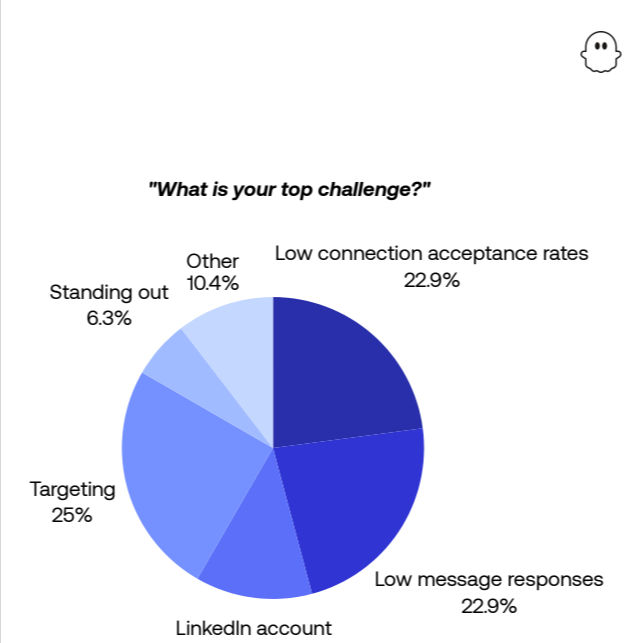
Industry research shows data-quality issues are costly; regardless of the exact figure, stale contacts waste time and budget. “Targeting the right prospects” was cited as a top-three challenge by 25% of participants in our report. This is often a symptom of duplicate records or outdated contact information.
When Sales Navigator users rely on static lists or manual spreadsheets, the data decays quickly. A prospect changes jobs, but your CRM still lists them at their old company. This leads to sales calls that hit dead ends and email addresses that bounce.
How to automate hygiene and duplicate detection
Data decays quickly, so you need to maintain it to keep your CRM trustworthy. To keep data clean, you need a system that acts as a gatekeeper. Stop duplicate records before they enter your pipeline whenever possible by validating the prospect against your existing database.
The strategy: Use PhantomBuster’s CRM Enricher automations as your duplication firewall. When these automations run, they cross-reference the unique LinkedIn profile URL against your current CRM records.
- If the URL exists, the system updates the record with current details (like a new job title) but keeps the ID the same.
- If the URL is new, it creates a fresh record.
This reduces duplicate spend and helps your team keep job titles current.
3. High performers enrich data for multi-channel outreach
The top performers in our study—the Accelerators (a segment of high-volume, high-acceptance reps; n=15)—achieve 6 accepted requests per hour while sending 76-100+ requests per week at a 45% acceptance rate. Results vary by audience, copy quality, and filter precision.
How do they maintain quality at that volume?
The report reveals they “rely heavily on sequencing and enrichment to maintain relevance at speed.” They refine ICPs, tighten filters, and use enrichment to ensure every request feels targeted, not generic.
Manually researching every prospect doesn’t scale. To reach Accelerator-level efficiency, you need to pull enriched data fast enough to support sequencing.
How to run an account-based marketing (ABM) enrichment flow
If you are targeting specific high-value accounts, you need to map out the entire buying committee, not just one contact.
The workflow:
Identify: Use PhantomBuster’s LinkedIn Company Employees Export automation. This allows you to extract up to 1,000 employees from a specific company page URL. Make sure you have defined Ideal Customer Profiles (ICPs) to enable effective targeting.
Filter: Use spreadsheet filters to isolate decision-makers (e.g., “Vice President,” “Director”).
Enrich: Feed these profile URLs into PhantomBuster’s LinkedIn Profile Scraper automation to visit profiles and extract data.
Result: You transform a single target account into a mapped hierarchy of 10+ decision-makers, complete with emails and phone numbers, synced directly to your CRM for coordinated outreach.
4. Sales teams struggle with “internal coding” barriers
14% of respondents cited CRM and system integration as what would most improve their LinkedIn prospecting experience.
The desire for integration is clear. One Sales Manager in Financial Services put it plainly: “Be automatically synced with Salesforce without coding.”
The report reveals that as teams layer more systems together, even simple tasks become clunky. Manual updates creep back in. Information gets lost. And it becomes difficult to tell whether workflows are making an impact.
How to implement no-code data pipelines
Modern sales operations should not require a computer science degree. The key is to use tools with native, authenticated integrations.
The solution: PhantomBuster offers native integrations with major platforms, including HubSpot, Salesforce, and Pipedrive. Use engagement signals captured by your PhantomBuster workflows (e.g., profile visits processed, connection acceptance) to inform lead scores in your CRM.
Connect your CRM like HubSpot or Salesforce to PhantomBuster for direct data sync. You can also export to Google Sheets for additional analysis and plan your outreach campaigns. This handles data collection and transfer in the background, allowing you to scale from tens to thousands of leads as your quota and plan allow.
5. Only 20% integrate CRM with LinkedIn activity
Our report reveals that just 1 in 5 sales professionals has integrated their CRM with LinkedIn prospecting. This creates a visibility gap that prevents leadership from seeing what’s actually driving the pipeline.
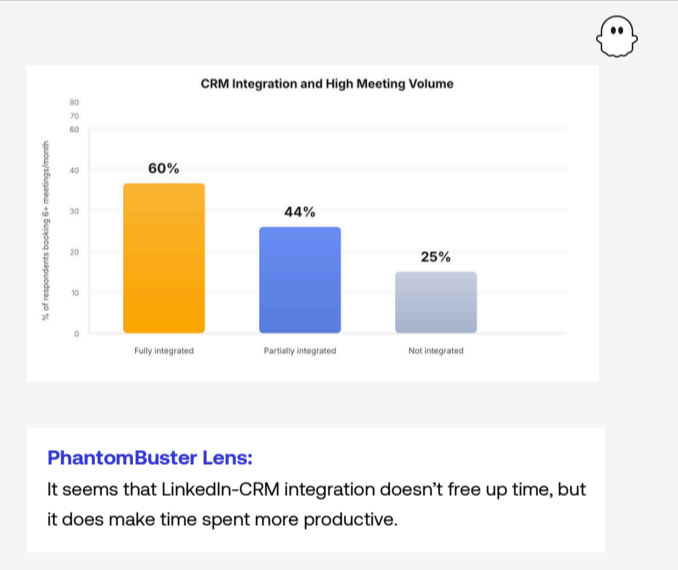
When LinkedIn activity lives in one system and CRM data lives in another, sales managers lose the ability to track which outreach efforts are converting. They can’t answer basic questions: Which messages are getting responses? Which prospects are engaging? What content is driving warm leads?
This disconnect means teams can’t optimize what’s working or fix what’s broken.
How to create full-funnel visibility
The solution is to treat LinkedIn activity as CRM data, not separate social media engagement.
The strategy: Use PhantomBuster’s CRM Enricher workflows to push processed LinkedIn events (e.g., detected job changes or connection acceptances from supported automations) into CRM activities where permitted. For example, you can set a workflow in HubSpot to update contact job title when the job-change field from PhantomBuster is updated.
You can map supported LinkedIn events from PhantomBuster outputs (e.g., sent requests, accepted requests) to CRM activities using the CRM Enricher automations and field mapping.
The benefit: Your CRM becomes a single source of truth. Sales managers can track conversion rates from LinkedIn engagement to accepted connections to booked meetings. And reps get credit for the warm-up work that actually drives deals.
6. 58% report low reply rates despite high activity
The report shows that 58% of respondents cite low message reply rates as a challenge, even though they’re actively prospecting. The problem isn’t effort. It’s that CRM systems don’t capture the context needed to personalize follow-up.
When your CRM only stores basic fields (name, title, company), reps have no context for follow-up messages. They can’t reference a prospect’s recent post, a company milestone, or a mutual connection. Every message feels like it’s starting from zero.
How to build context into your CRM
Stop treating your CRM like a contact database. Treat it like an intelligence system.
The workflow:
- Use PhantomBuster to capture recent posts and engagement signals that the automation supports (such as post activity and profile changes).
- Refresh this data regularly so job changes and activity stay current. Reps open a CRM record and see context, not just contact details.
- Reply rates tend to improve when follow-ups reference timely context.
CRM automation is not just about speed. It’s about accuracy.
Manual CRM work does not just waste time. It breaks trust in your data.
When records lag behind reality, targeting suffers, follow-ups lose relevance, and managers lose visibility into what actually drives the pipeline.
The teams that perform best do not work harder. They remove friction. They connect prospecting directly to their CRM, enrich data before it lands there, and treat LinkedIn activity as part of the sales system.
Frequently asked questions about CRM data integration
Why is PhantomBuster CRM integration important for clean data?
Manual entry often drives errors and lost selling time. Automating the LinkedIn-to-CRM flow reduces those errors. By syncing data from LinkedIn to your CRM via PhantomBuster, you help keep job titles, company info, and contact details current by scheduling regular updates and job-change checks.
Can PhantomBuster detect duplicate data?
Yes. The HubSpot, Salesforce, and Pipedrive CRM Enricher automations are designed to reduce duplicate records. They use the unique LinkedIn Profile URL as a key. If that URL already exists in your CRM, the automation updates the existing record rather than creating a duplicate.
Does the LinkedIn Search Export automation give me emails?
No. The LinkedIn Search Export automation extracts public data visible on the search page (Name, Headline, Location). To get email addresses, you chain this automation with the LinkedIn Profile Scraper automation, which visits the profile and uses an email discovery service (like Dropcontact or your chosen provider) to find and verify the email address.
What are the safe limits for extracting data?
To protect your account, we recommend processing up to 1,000 search results per day (or 2,500 with Sales Navigator) using the Search Export automation. For visiting profiles to extract data, stay within ~80–150 profiles per day depending on account age and limits. Monitor account health and adjust as needed.
Does this work with Sales Navigator?
Yes. PhantomBuster includes Sales Navigator-specific automations that support advanced filters and larger result sets, such as the Sales Navigator Search Export and the Sales Navigator Profile Scraper automation. These are designed to work with the higher data volumes available to Sales Navigator users, making them practical for building high-quality lists.
PhantomBuster won’t replace your entire stack, but for LinkedIn prospecting and CRM sync it reduces manual updates that slow teams down. Explore PhantomBuster workflows that fit your stack.
Sources and methodology
Unless otherwise noted, all figures in this report are based on LinkedIn prospecting data collected from October to December 2025 through our State of Sales on LinkedIn for 2026 survey. The study gathered insights from 104 B2B sales professionals, including founders, SDRs, team leads, and account executives across multiple industries and geographies.