
Sales teams need real-time insights about competitors, not reports that land a quarter late. The most reliable way is to automate competitor monitoring so updates reach your team as they happen.
When you automate monitoring, you collect key updates (pricing changes, feature launches, and customer reviews), turn them into clear summaries, and push them into sales, product marketing, and decision-making workflows.
This guide shows how to build a simple, ethical system that reduces manual research and gives your team a clear edge in live deals.
Why competitor monitoring demands automation today
Competitor activity evolves faster than any manual process can track. Pricing changes, feature launches, and customer reviews appear daily across multiple channels.
Manual checks miss market movements, and static data loses value quickly. With PhantomBuster, you track changes in real-time, analyze unstructured updates, extract signals from public social posts, and summarize competitor moves for your team.
Your sales and marketing teams stay informed without spending hours on repetitive research.
Which data sources matter most for competitive intelligence
Focus on sources that reflect intentFocus on sources that reflect intent, momentum, and potential impact on your pipeline. Prioritize the following data sources for competitive insights.
- Competitor sites and changelogs for feature releases, campaign launches, and positioning shifts
- Pricing pages and plan footnotes for prices, hidden limits, and usage caps
- Public social posts and engagement for announcements, executive statements, and launch traction
- Review sites for customer feedback, common objections, and competitive deals mentioned in reviews
- News articles and press releases for funding, partnerships, and market entries
- Hiring pages and LinkedIn updates for organizational changes that signal new go-to-market moves
- Financial reports for market signals that inform pricing and positioning decisions
These sources combine structured and unstructured data. PhantomBuster’s AI-powered enrichment.These sources combine structured and unstructured data. PhantomBuster’s AI-powered enrichment unifies these sources and delivers data-driven summaries your sales team can act on.
How to design an automated competitor monitoring workflow
A practical workflow collects, cleans, and routes competitive intel to people who need it. Use this simple pattern.
1. Collect signals on a schedule
Automate competitor data collection from key competitors’ websites, pricing pages, product blogs, and social posts. Pull recent review snippets and news headlines. Capture data points like plan limits, new features, and dates to enable real-time insights and historical analysis later.
2. Enrich, normalize, and summarize
Standardize fields such as product names, plan tiers, and currencies. Use AI-powered summarizationStandardize fields such as product names, plan tiers, and currencies. Use AI-powered summarization to tag each item (pricing change, feature launch, campaign, or customer sentiment).
This converts raw data into competitive insights that are easy to scan.
3. Route insights to the right teams
Send summaries to Slack or email for sales teams, and sync structured records to your CRM or Google Sheets. Tag items by account, segment, and impact level.
Sales reps see competitor notes in the CRM record, so they can address pricing or feature objections on live calls.
4. Trigger actions
Link insights to sales playbooks. For example, when a competitor raises prices, trigger a pricing objection talk track.
When a competitor ships a feature you already offer, trigger a targeted sequence to at-risk accounts with a one-line outcome comparison (e.g., “fewer steps to onboard”).
How PhantomBuster fits into your competitive intelligence stack
PhantomBuster helps you automate repeatable steps across platforms and syncs the results to your CRM so reps get updates where they work.
Here’s the complete workflow:
Collect competitor signals → Enrich with AI → Route to your tools → Act with personalized outreach.
Collect competitor signals from the open web
- Track live updates reliably: Use PhantomBuster’s Data Scraping Crawler automation to extract and monitor competitor blogs, pricing pages, and changelogs, then pass results to enrichment. Each automation run logs URLs, timestamps, and snippets so product marketing can validate the context behind every update.
- Capture public engagement: Use the LinkedIn Post Commenter and Liker Scraper to collect public names and profiles on competitor announcements, within LinkedIn’s guidelines and reasonable volumes. Then pass those records through the Advanced AI Enricher to identify their job titles, companies, and locations, ideal for creating targeted outreach lists.
Clean, enrich, and classify data
- Use PhantomBuster’s AI Enricher to automate cleanup of product names, pricing tiers, and currencies across the data you collected so teams can compare data apples-to-apples.
- Pull more insights on companies directly from LinkedIn company pages using https://phantombuster.com/phantombuster/3296/linkedin-company-scraper?.
- Centralize for collaboration: Push organized data to Google Sheets for visibility or sync key fields to HubSpot with the HubSpot Contact Sender so sales and marketing share the same current view.
Turn intelligence into sales and marketing actions
- Start personalized outreach: Build lead lists from public engagement and trigger the LinkedIn Outreach automation that crafts AI-personalized messages and follow-ups at modest volumes, referencing real engagement signals.
PhantomBuster’s value is consistent: keep data fresh, route it to your tools, and help teams act on it so sales teams win deals with informed, timely responses.
What a weekly automated workflow looks like
Use this example to get started. Adjust volumes to your plan and territory:
| Step | Tools | Frequency | Output |
|---|---|---|---|
| 1. Set your sources | Google Sheets or your CRM (e.g., HubSpot, Salesforce) | One-time setup; review quarterly | List five competitors with URLs: blog, pricing page, product changelog, top social handles, review pages, key industry pubs |
| 2. Schedule daily data pulls | PhantomBuster LinkedIn Activity Extractor and LinkedIn Post Commenter and Liker Scraper automations | Daily at 9 a.m. local time | Appended rows with columns: source, competitor, date found, category, summary |
| 3. Auto-enrich and categorize | Google Sheets formulas, PhantomBuster Advanced AI Enricher automation | Daily (post-pull) | Standardize titles, companies, and currencies; add category tags (pricing, feature, partnership, hiring, sentiment); add a two-line summary plus a one-line “why it matters” |
| 4. Distribute summaries | Trigger a Zapier flow from PhantomBuster to Slack or email | Daily digest; Weekly roll-up | Send the top five items, a link to the master sheet, and suggested talk tracks to SDRs; share weekly trend charts with product marketing and leadership |
| 5. Create sales plays from signals | HubSpot CRM Enricher | Trigger-based / Continuous | * Pricing change: Notify reps, attach comparison one-pager, and suggest target accounts. * Feature gap closed: Update discovery questions and alert AEs. * Negative reviews: Build objection-handling cards and send short follow-up sequences. |
How to measure impact and improve your process
Track the outcomes that prove competitive intelligence efforts are working:
- Measure engagement lift and meetings booked: Measure response rates and booked meetings when sales messages reference recent competitor insights or pricing shifts. This shows how timely intelligence improves outreach relevance.
- Win rate improvement by competitor: Compare win rates before and after implementing your workflow to see if competitive insights are helping reps counter objections and close more deals in head-to-head situations.
- Shorter sales cycles: Track whether deals influenced by competitive insights move faster through the funnel, an indicator that reps are handling objections early and positioning better.
- Content and messaging performance: Evaluate product marketing content inspired by competitive intelligence (e.g., comparison one-pagers, objection-handling guides). Measure engagement, downloads, or usage in active deals.
- Data freshness and accuracy: Monitor duplicate rate, update latency, and manual rework to ensure your automation remains reliable.
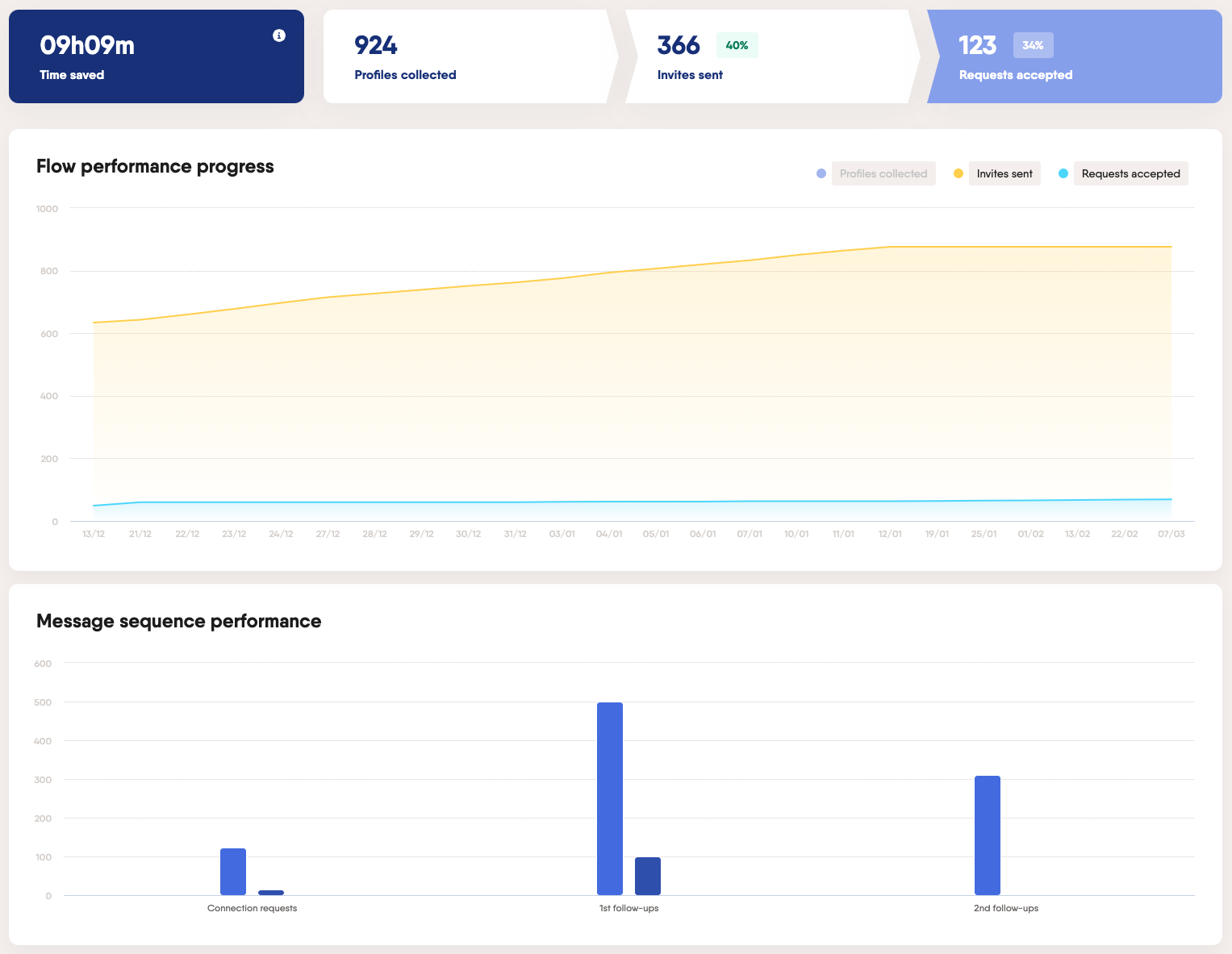
- Flow performance metrics: Track pipeline health in real-time with indicators such as:
- Profiles collected: Number of new leads or competitor contacts identified (e.g., 30 in a run).
- Invites sent: Outreach volume from those profiles (e.g., 90-95% completion rate target).
- Requests accepted: Engagement success rate (e.g., 27% acceptance).
- Progress over time: Visualize collection-to-conversion ratios to identify which competitor signals generate the highest sales momentum.
Use these metrics to refine data collection frequency, categories, and who receives which summaries.
What ethical considerations keep you safe
Responsible competitive intelligence starts with respecting boundaries:
- Always collect data from publicly available sources like websites, social posts, and reviews, and never from private or restricted platforms.
- Keep volumes within platform guidelines to avoid unsolicited activity flags or policy violations.
- Be transparent about how insights are gathered, especially when sharing internally, and focus on using information to improve positioning, not to manipulate competitors or mislead prospects.
Maintaining ethical data practices protects your brand’s credibility, ensures compliance, and keeps your monitoring systems sustainable in the long run.
Common pitfalls and how to avoid them
- Too much raw data without summaries. Add a one-line “why it matters” (e.g., “Price up 12% on Pro, position annual discount”).
- Intelligence loses impact if it never leaves the spreadsheet. If AEs do not see intel in their daily tools, they will not use it. Automate routing to Slack, CRM, or email digests so AEs and marketers see it where they work every day.
- Manual or ad-hoc updates quickly become outdated. Use scheduled automations and real-time alerts to keep feeds fresh and decisions timely.
- Unclear ownership. Assign a product marketing owner for oversight and a sales manager to ensure adoption.
- Lack of feedback loops. Regularly review which insights were actually used in deals or campaigns. Close the loop to improve data quality and relevance over time.
What to track and why
- Competitive intelligence: Daily signals you can use in discovery and renewal calls to enable strategic decisions
- Competitor monitoring: Daily workflows that track moves across channels to identify trends, risks, and opportunities
- Market intelligence: The broader view that includes industry trends, market conditions, and emerging patterns
- Actionable intelligence: Insights paired with recommended next steps for sales and marketing
FAQs
What is the fastest way to start monitoring competitors with automation?
Pick three competitors, define five sources each, and schedule daily PhantomBuster runs into a single Google Sheet. Add simple AI summaries and route a digest to your sales team. Expand once the habit sticks.
Which competitive intelligence capabilities should a sales team prioritize first?
Start with pricing data changes, product updates, and high engagement social posts. These provide timely insights that sales reps can use immediately in conversations.
How do I turn competitive insights into more deals?
Use competitive insights to refine your positioning, address competitor weaknesses in your messaging, and personalize outreach using data-driven talking points. Feed insights into sales enablement materials, update pitch decks, and train reps to pre-empt objections with clear, evidence-backed advantages.
For example, when a competitor announces a price increase, message accounts in renewal with a clear comparison and benefit statement. When a competitor launches a feature you already offer, send a short explainer framing your outcome advantage.
How do we keep data quality high across multiple sources?
Keep data quality high by standardizing names, normalizing currencies, and keeping consistent categories. Use Google Sheets data validation or your CRM’s picklists and review a small sample weekly to catch drift.
Can automation help with SWOT analysis and feature comparisons?
Yes. Chain PhantomBuster’s Data Scraping Crawler with the Advanced AI Enricher to surface strengths and weaknesses from changelogs, reviews, and posts, then push to a SWOT tab in Google Sheets.
Is there a risk of automating social interactions during competitor monitoring?
Yes, automating social interactions can cross ethical or compliance boundaries such as violating platform policies or misinterpreting tone. It may also erode authenticity and trust if automated actions engage with competitor posts or profiles without human oversight.
Keep volumes modest, respect platform guidelines, and prioritize genuine engagement. Focus on intelligence gathering, not mass messaging.
What should product marketing look for in market trend analysis?
Product marketing should track emerging customer needs, competitor positioning, pricing shifts, and technology adoption patterns. Analyze sentiment, search trends, and engagement data to anticipate demand shifts and identify whitespace opportunities and turn insights into messaging, feature priorities, and go-to-market timing.
How do we prove ROI to leadership?
Track win rate by competitor, meeting conversion on messages that reference insights, and time saved compared to manual competitor research. Combine these with pipeline influenced by competitive plays to show a clear lift.
With this system, your team gets weekly digests, real-time alerts on pricing and launches, and CRM notes ready for live calls. Reps handle objections faster, product marketing refreshes positioning weekly, and leadership sees deal impact tied to real-time competitor events.
Ready to turn competitor tracking into a steady flow of sales-qualified leads (SQLs)? Start a 14-day free trial and ship your first competitor digest to Slack in under 30 minutes.