
As of January 2026, high-acceptance teams prioritize fewer, better-targeted requests over volume. The data confirms it.
We analyzed responses from sales professionals, founders, and sales leaders across multiple industries for The State of Sales on LinkedIn for 2026 (published December 2025). The results challenge the traditional volume-based sales process.
Below are four benchmarks and the exact steps to act on them. We also show how to run the same workflow with PhantomBuster Automations to help sales teams move away from manual grunt work and focus on building relationships.
Quick summary: Key benchmarks for 2026
Source: The State of Sales on LinkedIn for 2026 report (December 2025)
| Metric | Top performers (booked ≥5 meetings/month) | Average performers |
|---|---|---|
| Weekly connection requests | Fewer than 25 (tight ICP filters, manual review) | 100+ (broad lists) |
| CRM integration | Fully synced | Manual entry |
| AI usage | Daily (research & drafting) | Rare / Never |
| Primary challenge | Differentiation | Low acceptance rates |
1. Do fewer than 25 requests per week really lift acceptance?
There is a common misconception among sales reps that hitting the weekly LinkedIn limit is the only way to hit sales quotas. Our study shows the opposite pattern.
In our dataset, respondents who send fewer than 25 connection requests per week reported higher acceptance rates than those maxing out their limits. Teams that applied ICP filters (role, seniority, recent activity) saw measurably better outcomes.
Sales professionals who focus on volume often struggle with relevance. As one survey respondent noted, the challenge isn’t just finding people, but finding the right people:
LinkedIn is extremely limited in its ability to screen ICP and the data is less reliable than other sources.
Founder/Business Owner, North America
How to curate leads for higher acceptance rates
You don’t need to manually hunt for prospects to achieve curation. Building a shortlist of decision-makers before you send any requests keeps outreach under LinkedIn’s daily caps and focuses time on the 10–20% most likely to accept.
Outcome: Build a 50-lead shortlist in under 20 minutes.
The workflow:
- Use the PhantomBuster Sales Navigator Search Export Automation as step 1 of your shortlist workflow.
- Export your filtered list (aim for 200–500 profiles to sample). This range balances sample size with review time.
- Filter the CSV for specific job titles or social selling signalsFilter the CSV for specific job titles or social selling signals (like recent job posts or company mentions).
- Prioritize the top decile by fit score (title, seniority, recency of activity). For most teams, that’s 10–20% of the list.
2. How much does personalization change acceptance?
Our survey revealed a “fear of automation” among sales teams. While AI tools are becoming standard for marketing teams, many sellers are hesitant to hand over the reins for direct LinkedIn messages.
However, the data shows that sales teams who prioritize personalizationHowever, the data shows that sales teams who prioritize personalization in their connection requests see substantially higher acceptance rates than those sending bulk, non-personalized outreach. The key is using automation to enable relevance, not just increase volume.
“I manually send my message b/c I’m afraid I would send the wrong message without personally viewing their LinkedIn Profile first.
Founder/Business Owner, Manufacturing Industry
How to scale personalized LinkedIn outreach with AI
To bridge the gap between scale and safety, you need LinkedIn automation that understands context. PhantomBuster uses AI to summarize the profile data you provide, so you can draft relevant intros without writing from scratch.
This works because the AI analyzes the fields you supplyThis works because the AI analyzes the fields you supply using effective prompt engineering rather than guessing from a template. Follow LinkedIn’s terms and keep daily actions conservative.
Outcome: Draft personalized messages for 20 profiles in 10 minutes, then review before sending.
The workflow:
- Deploy the PhantomBuster AI LinkedIn Message Writer Automation.
- In the AI LinkedIn Message Writer Automation, point the Automation to the profile URLs you exported. It will use the fields you supply (headline, title, company, latest post link) to draft a first pass.
- Allow the AI to draft a message based on their data, not a generic template.
- Review the outputs in the results file to ensure safety and relevance before sending.
3. Does CRM integration affect meetings booked?
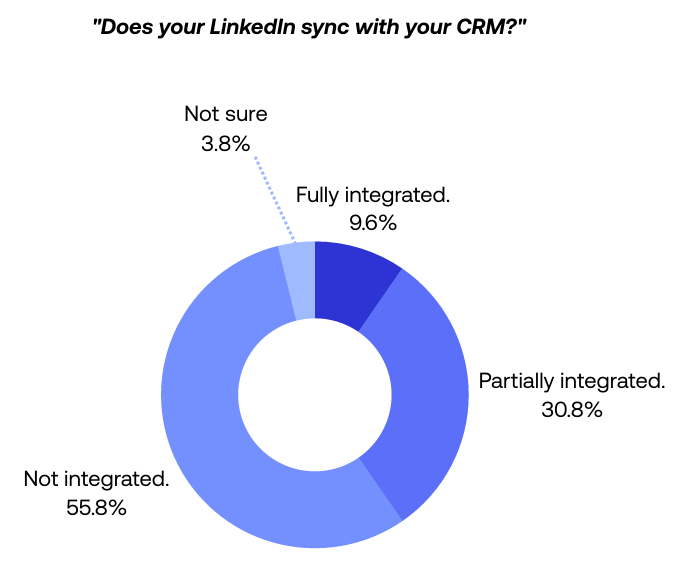
Manual CRM updates reduce visibility and slow follow-up. Our study found that over 50% of sales professionals update their CRM manually or not at all.
When social selling data lives separately from your central database, sales leaders lose visibility, and sales reps waste hours on data entry. Top teams route LinkedIn-sourced contacts and notes into HubSpot or Salesforce automatically (via integrations), so new connections and replies appear in the CRM within a day.
Our research shows that 56% of teams lack CRM integration and only 10% are fully integrated (source: The State of Sales on LinkedIn for 2026, Figure 3).
How to sync data to your CRM automatically
Replace manual copy/paste with an automated sync of new connections and replies. This workflow ensures every new connection and conversation is mirrored in your CRM, keeping your data hygienic and your team focused on selling.
Outcome: Sync 100% of LinkedIn acceptances and replies into your CRM with zero manual entry.
The workflow:
- Use the PhantomBuster HubSpot CRM Enricher Automation as part of your LinkedIn → CRM sync workflow (or the equivalent for Salesforce/Pipedrive).
- Connect your CRM account to your PhantomBuster account.
- When a lead accepts or replies, enrich with consented or publicly available fields (company, role, profile URL) and push to the CRM. Avoid collecting private emails without permission and respect platform limits.
4. Do AI users book more meetings?
One of the most telling insights from our report came from a VP of Sales who highlighted the need to evolve beyond simple connections.
To find another way to differentiate, generate a conversation — not just a connection. At the beginning, LinkedIn was not for the masses; now it is massive.
VP Sales, Financial Services
Our statistics confirm this: In our December 2025 sample, respondents who use AI tools extensively (daily) were 3.5× more likely to book more than 5 qualified meetings per month (see The State of Sales on LinkedIn for 2026 report). They combine research, warm-up actions, and CRM sync into one sequenced workflow.
How to warm up leads before the pitch
Don’t just send a request; become familiar first. A “warm-up” sequence—viewing their profile and liking their latest post before connecting—increases name recognition and improves acceptance.
This works because the subtle notification primes the prospect to recognize your name when the connection request arrives. Cap warm-up actions to a small daily number (10–15 profiles), randomize timing, and follow LinkedIn’s terms.
Outcome: Warm up 10 high-priority leads per day, then connect 24 hours later.
The workflow:
Create a PhantomBuster workflow that sequences Profile Visitor → Auto Liker → Auto Connect with a 24-hour delay:
- Use the PhantomBuster LinkedIn Profile Visitor Automation to appear in their notifications.
- Next, set up the PhantomBuster LinkedIn Auto Liker Automation to like their latest post (if available).
- As the final step, use the PhantomBuster LinkedIn Auto Connect Automation to send a connection request 24 hours later.
Frequently asked questions about LinkedIn sales statistics
What are the most effective LinkedIn statistics for sales in 2026?
Based on our report, the most critical metrics for sales success involve curation and hygiene. In our 2026 study, teams sending fewer than 25 highly targeted requests per week and those with CRM sync showed higher median acceptance and fewer lost leads (see The State of Sales on LinkedIn for 2026 report). Sales teams with auto-synced CRMs lose fewer leads to administrative errors.
How does LinkedIn automation affect the Social Selling Index (SSI)?
LinkedIn automation can improve your SSI if used to support a high-quality strategy. By automating consistent profile views and targeted requests, you improve your “Find the right people” score.
Used carefully, consistent profile views and targeted requests can correlate with higher SSI components. Keep volumes low and human-paced. Social sellers automating engagement on LinkedIn posts may boost the “Engage with insights” metric, provided the volume remains low and human-like.
What is the average acceptance rate for LinkedIn connection requests?
In our dataset, curated and personalized requests showed median acceptance rates substantially above bulk outreach. Sales reps using curated lists and personalized messages see higher acceptance rates, while non-personalized requests fall below the median, proving that sales success relies on relevance rather than volume.
How can B2B sales teams use AI without sounding robotic?
Sales teams should use AI primarily for research and drafting rather than final execution without oversight. The best approach is to use PhantomBuster’s AI LinkedIn Message Writer Automation to summarize a prospect’s recent post or company news link you provide, then edit the hook before sending. This blends efficiency with authenticity.
Is Sales Navigator worth it for small teams?
For small teams, Sales Navigator helps with granular filters (e.g., posted in last 30 days, job changes). It adds cost; consider it if LinkedIn is a primary channel and your TAM is well-defined. The ability to filter by “posted on LinkedIn in the last 30 days” or “changed jobs recently” allows for the granular targeting that high-quality leads require, which is difficult to achieve with a free account.
What are safe daily limits and policy considerations?
Keep daily connection requests under 25 and profile views/likes under 15 per day. Randomize timing across business hours. Follow LinkedIn’s terms of service and Sales Navigator policies. If you’re using automation, build in delays between actions and never run multiple high-volume operations simultaneously. The risk here is account restrictions; conservative volume protects your account health over time.
Run your LinkedIn sales workflow in PhantomBuster
You’ve seen the four benchmarks that separate high-performing sales teams from the rest. Now it’s time to build the system.
PhantomBuster offers one integrated workflow that shortlists, personalizes, warms up, and syncs to your CRM—so you can spend less time on manual prospecting and more on closing deals.