

Spray-and-pray outreach underperforms compared with intent-based targeting in 2026. In our 2025 report, “The State of Sales on LinkedIn for 2026,” we surveyed thousands of sales professionals to identify the single biggest friction point in their revenue engine.
The answer wasn’t “closing” or “negotiation.” It was “Targeting the right prospects.”
Respondents said that relying mostly on job title, seniority, and company size often misses purchase intent. These searches can include low-intent or inactive profiles, which reduces reply rates.
Relying on raw lists and bulk requests typically lowers acceptance and reply rates. In our report, teams prioritizing intent signals saw higher reply rates than those using static filters alone.
Here’s an integrated PhantomBuster workflow that mirrors how top teams operationalize intent signals—capturing engagement, qualifying with AI, and syncing to CRM.
Move beyond demographics: target by intent
Static data (who they are) is useful. Behavioral data (what they are doing) correlates with higher reply rates and faster qualification. Our report shows that sales reps who focus on active engagement metrics outperform those relying on cold search results.
Instead of targeting everyone with the title “Head of Sales,” target the people engaging with the problems you solve.
The strategy: competitor audience targeting
Don’t guess who is interested. Look at who is engaging with your competitors or industry thought leaders.
The workflow:
- Identify the signal: Find a viral post from a competitor or an influencer discussing a pain point you solve.
- Extract the audience: Use the PhantomBuster LinkedIn Post Likers Export automation. This pulls the profile URLs of everyone who liked that specific post.
- Why this works: You aren’t guessing. You have a list of people who are active right now and care about your specific topic. This surfaces prospects who recently engaged with relevant topics, improving your odds versus a cold list.
Stop “cleaning” lists manually: use AI as your gatekeeper
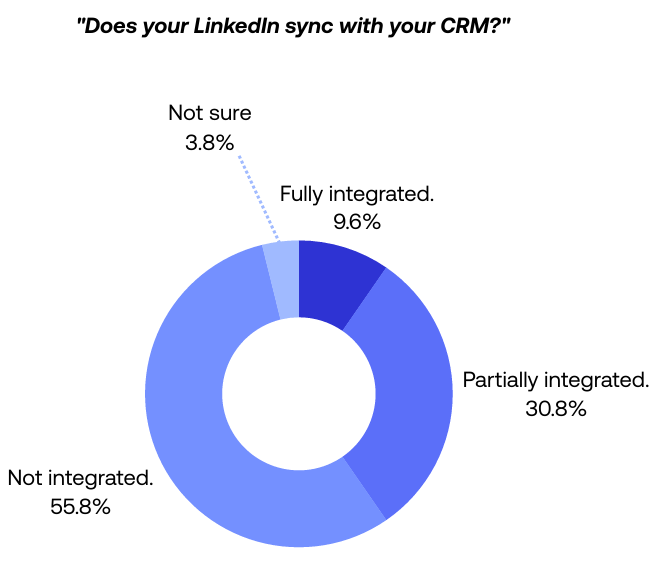
In our report, 56% of sales teams said they don’t sync their LinkedIn data to their CRM. Many reps export a list and then spend hours manually checking if the prospects are actually decision makers.
The best practice of 2026 isn’t working harder; it’s using AI to filter your data for you.
The strategy: AI qualification layer (filter leads before outreach)
Reduce outreach to unqualified leads. Use AI to read the profiles for you.
The workflow:
- Take your raw list (from a Sales Navigator search or a PhantomBuster post-engagement export).
- Feed it into the PhantomBuster AI LinkedIn Profile Enricher automation.
- The Prompt: Give the AI specific criteria. For example: “Is this person a decision-maker for cybersecurity software? Answer Yes/No.”
- The Result: The AI analyzes each profile’s headline, about section, and recent activity pulled into your lead list. You get a clean CSV you can filter by “Yes,” with only a quick spot-check needed. We recommend reviewing 10 random rows to confirm accuracy.
The “social warming” protocol
In our report, sales reps sending fewer than 25 connection requests per week saw higher acceptance rates than those sending high volumes. This pattern held across multiple segments.
Why? Because they make the request feel organic. If you send a request out of the blue, you are a stranger. If you engage first, you are a familiar face.
The strategy: automate “pre-outreach” engagement
You need to show up in their notifications before you show up in their inbox. Build this as a single PhantomBuster sequence so each step flows automatically.
The workflow:
- Visit: Add the PhantomBuster LinkedIn Profile Visitor automation to your sequence. This puts your face in their “Who’s viewed your profile” list.
- Engage: In the same PhantomBuster workflow, add the LinkedIn Auto Liker automation to like a recent post.
- Wait: Add a 24–48 hour delay with PhantomBuster’s scheduler to avoid bursty activity and to let your prior touch register.
- Connect: After 24–48 hours, add LinkedIn Auto Connect to the same workflow so the request follows prior touches.
Why this works: By sequencing visit → like → connect, your request arrives after prior lightweight interactions, which tends to increase acceptance rates.
The “CRM truth” strategy
Targeting fails when you target the same person twice or reach out to existing customers. Our report highlights that data hygiene is a major differentiator for high-growth organizations.
A reliable targeting strategy depends on an up-to-date CRM.
The strategy: real-time sync with PhantomBuster CRM enrichment
Stop treating LinkedIn and your CRM as separate islands. Use PhantomBuster’s CRM enrichment automations within the same workflow.
The workflow:
- Use PhantomBuster’s CRM enrichment automations for HubSpot, Salesforce, or Pipedrive within the same workflow.
- Set it to trigger whenever a new connection is made, or a specific lead generation action occurs.
- This keeps key fields (company, title, email when available) up to date within your set sync window.
- The Benefit: This reduces marketing–sales collisions because exclusion lists stay current.
Final thoughts: target smarter, close faster
The sales teams winning in 2026 aren’t sending more messages; they’re targeting with intent. PhantomBuster helps turn LinkedIn activity into prioritized lead lists fast, with your criteria defining qualification.
Start building smarter lead lists today with your free 14-day trial of PhantomBuster.
Frequently asked questions about PhantomBuster targeting
Why is intent-based targeting better than Sales Navigator filters?
Sales Navigator primarily surfaces firmographic and role data; intent requires engagement signals (e.g., interactions with relevant posts). Intent-based targeting (like extracting LinkedIn post likers) identifies prospects who are currently engaging with relevant topics, which tends to improve reply rates versus cold lists.
How does “social warming” impact lead generation?
Our data shows that higher volume doesn’t necessarily improve outcomes. By spacing lightweight interactions (visit → like) before connecting, your outreach feels more natural. This warming process often improves acceptance rates versus cold outreach.
Can PhantomBuster filter leads automatically?
Yes. With the AI LinkedIn Profile Enricher automation, you can use artificial intelligence to analyze profiles against your specific criteria (e.g., “Do they work in B2B SaaS?”). This replaces manual CSV cleaning and helps you focus resources on high-fit decision-makers.
Is using PhantomBuster for targeting safe?
Yes, provided you follow platform rules. PhantomBuster works by automating actions you would do manually (like visiting a profile). To keep your LinkedIn account safe, follow PhantomBuster’s in-app Safety Limits guidance and LinkedIn’s policies, and prioritize quality interactions over volume.
Do I need a premium LinkedIn account?
While you can use standard LinkedIn, we recommend Sales Navigator. It adds advanced filters and saved lists that make targeting and workflows smoother, enabling more efficient prospecting at scale.