
Most LinkedIn sellers operate inside the same narrow band. Our State of Sales on LinkedIn for 2026 report finds most sellers cluster around 30–40% acceptance, with a small upper tier above 60%. That pattern suggests adding more requests alone won’t lift acceptance.
Social warming—creating recognition before you connect—raises acceptance rates compared with cold requests. Instead of sending cold requests, high-performing sales reps build familiarity before they reach out. The report shows that reps who send fewer than 25 connection requests per week tend to see higher acceptance, likely due to tighter targeting and more personalized outreach.
Here’s a workflow you can run with PhantomBuster to warm prospects and improve connection acceptance—without increasing volume.
Quick look: the social warming impact
Here’s how a cold outreach sequence compares to a social warming workflow. Create recognition before you connect so your request isn’t unexpected.
| Stage | The “Cold” Way | The “Warmed” Way (PhantomBuster) |
|---|---|---|
| First Contact | Unexpected connection request | They’ve seen your profile/activity |
| Follow-Up | Generic pitch | They’ve seen you interact with a recent post |
| The Ask | “I’d like to connect…” | “Saw your recent post…” |
| Result | Ignored / Declined | Recognized name → higher acceptance |
Note: Keep engagement manual and paced within platform limits for best results.
1. Data finding: familiarity drives acceptance
Prospects are more likely to accept when they recognize your name from prior, relevant interactions.
When you send cold requests at scale, acceptance typically drops. Warming interactions first increases acceptance compared with cold outreach. The key difference is timing: when a prospect has noticed your name before your connection request arrives—through profile visits, content engagement, or other touchpoints—they’re more likely to accept.
The principle is straightforward: prioritize conversation over connection-only outreach.
How to build familiarity before the request
You won’t reliably visit dozens of profiles every morning. That’s manual work and it doesn’t scale. You need a workflow that builds presence for you.
The strategy: Extract context, then route manual engagement tasks.
The workflow:
- Import leads: Create a Google Sheets document with your target LinkedIn profile URLs (extracted via LinkedIn Sales Navigator).
- Extract activity: Use the PhantomBuster LinkedIn Profile Visitor automation to collect profile data and recent activity for your list.
- Route tasks to your CRM: Push a daily batch of manual engagement tasks (visit profile, review recent posts, consider following, add context note) to your CRM using the PhantomBuster HubSpot Contact Sender automation (or equivalent). This ensures reps complete engagement manually at a human pace as part of your LinkedIn-to-CRM workflow. This ensures reps complete engagement manually at a human pace.
- Pace your outreach: Spread engagement over several days—visit a profile one day, engage with a post the next, send your connection request a few days later.
Result: Your prospect is more likely to have seen your name from recent, relevant interactions. You’ll be more recognizable than a cold sender.
2. Data finding: engagement signals intent
It’s not enough to just look. You must engage. Our 2026 report emphasizes that authentic conversations stem from relevant interactions.
Targeting relevant posts shows you’re paying attention and raises the odds your request gets accepted. A prospect who sees relevant engagement is more likely to view you as a peer, not just another salesperson.
How to identify and engage with recent posts
Liking a prospect’s recent content is the digital equivalent of a friendly nod—do it manually and sparingly. It builds goodwill without requiring a response.
The strategy: Soft-touch engagement.
The workflow:
- Use the PhantomBuster LinkedIn Activity Extractor automation to collect each lead’s latest posts.
- Review the extracted posts and identify which ones are relevant to your industry, offering, or expertise.
- Send a daily task list to your CRM with specific engagement actions (e.g., “like most recent post,” “comment with insight on X topic”) so reps engage manually.
- Keep the pace natural—one or two interactions per prospect per week.
Result: The prospect sees that you’ve engaged with their content. When you send the request a few days later, they associate your name with positive, relevant engagement.
3. Data finding: personalization multiplies results
Warming opens the door. Personalized connection requests help you walk through it.
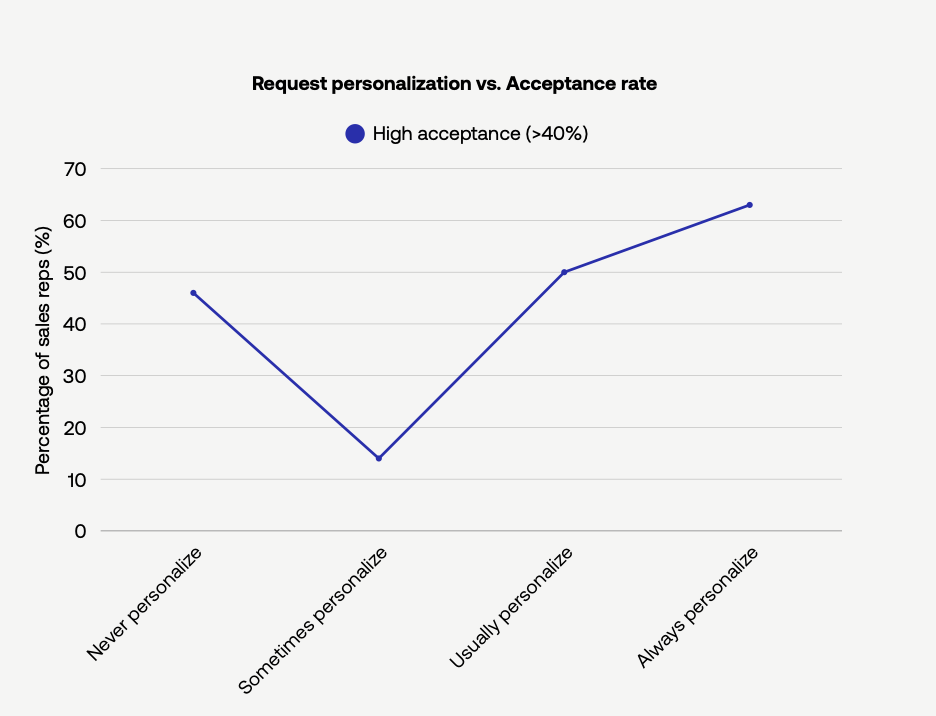
The 2026 report shows that sellers who personalize most of their outreach perform meaningfully better than those who rely on templates. The value doesn’t come from personalization tokens. It comes from using relevant context gathered during warming.
How to scale hyper-personalized outreach
Using the data extracted during your warming steps, you can craft AI-generated messages that reflect a prospect’s job title, themes they mention, or topics they care about.
The strategy: AI-driven context.
The workflow:
- Use the profile data extracted during your warming steps.
- Feed that data into the PhantomBuster AI LinkedIn Message Writer automation to generate a short, personalized note.
- In your prompt, instruct the AI to reference the prospect’s job title, a keyword from their About section, or a theme surfaced during warming.
- Review the AI-generated note, refine as needed, then send the request manually with the message attached.
Result: Your outreach feels intentional, informed, and relevant, which helps you rise above the crowded 30–40% acceptance band.
4. Data finding: integration prevents loss
The 2026 report highlights fragmentation across sales processes. Many sales teams struggle to track who is warmed, who connected, and who needs follow-up. When conversations remain inside LinkedIn instead of moving into a CRM, momentum is lost.
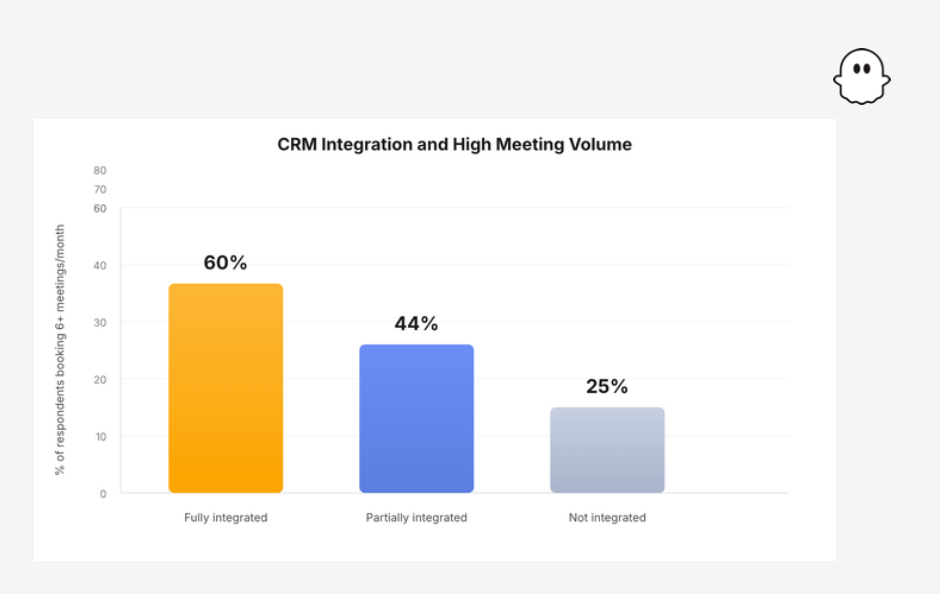
The report shows CRM integration correlates with higher meeting volume. Once a lead list is warmed and begins accepting connection requests, the priority is simple: ensure every new connection flows directly into your CRM where it can be tracked and acted upon.
How to sync warm leads to your CRM
Don’t let your new connections disappear into your LinkedIn inbox.
The strategy: Instant sync.
The workflow:
- Use the PhantomBuster HubSpot Contact Sender automation to create or update CRM contacts from your warmed list. Salesforce and Pipedrive integrations are also supported.
- Schedule a daily export of new connections from your warmed list, then pass those records to the automation to create or update contacts and tasks in your CRM.
- Tag each contact with the warming context (profile visited, post engaged, personalized note sent) so reps have full visibility for effective follow-up sequences.
Result: Your CRM receives qualified leads who already recognize your name, along with their company details and a record of your warming process. This helps ensure warm leads don’t get lost once conversations begin.
Frequently asked questions about social warming
What is PhantomBuster social warming?
PhantomBuster social warming is a workflow for building familiarity before you send a connection request. You extract public data, identify shared topics or recent activity, and reference that context in your note. This makes your request feel relevant rather than cold, increasing the chances that the prospect recognizes your name.
How does social warming affect acceptance rates?
Social warming increases acceptance rates by improving recognition. The 2026 report shows that sellers who take a more selective and contextual approach outperform those who rely on volume. When your request reflects real context, prospects are more likely to trust the message and rise above the common 30–40% range where most sales reps operate.
Is automating likes and follows safe?
PhantomBuster doesn’t support automating likes, follows, or profile visits. LinkedIn discourages automation of in-app actions and may restrict accounts that use it. Keep these steps manual and paced. PhantomBuster focuses on extracting public data, organizing your target audience, and helping you craft contextual outreach that feels personal without relying on restricted automation.
Do I need Sales Navigator for this?
You can run social warming without Sales Navigator, but it works better with it. Sales Navigator improves search precision and makes it easier to build accurate lead lists. Paired with the PhantomBuster LinkedIn Search Export automation and the PhantomBuster LinkedIn Profile Scraper automation, you can identify your target audience more effectively before sending your connection request.
What is the best sequence for warming?
The best social warming sequence is simple and consistent. Start by identifying your target audience and extracting public profile data. Group leads by relevance in your CRM using tags or stages, or in Google Sheets. Then route daily engagement tasks (profile visit, post like, follow) to your reps so they complete them manually over several days. Finally, send a short, contextual connection request that references one detail from your research. This approach builds familiarity without overwhelming the prospect.
Try the warm-then-connect workflow
Social warming shifts LinkedIn prospecting from volume to recognition. Extract context from your target list, route manual engagement tasks to your team, generate personalized notes with AI, and sync new connections to your CRM. The result: higher acceptance rates, stronger pipeline quality, and fewer cold rejections.
Ready to get started? Set up your first social warming workflow with PhantomBuster: extract profile and activity data, build a daily engagement task list, craft contextual connection requests, and sync accepted contacts to your CRM.