

The best LinkedIn Chrome extensions help sales reps move faster by instantly pulling emails from LinkedIn profiles, staying organized with auto-sync to their CRM, and cutting repetitive tasks like manual copy-pasting during prospecting.
But with so many LinkedIn automation tools out there, choosing what to install is tricky. We ran hands-on checks across 10 tools in October 2025, focusing on enrichment quality, CRM sync, and safety to shortlist the most effective extensions for SDRs, BDRs, AEs, and solo sales professionals.
This guide shows what each extension does best, whether it’s real-time enrichment, CRM syncing, or safe automation, so you can pick the right stack for your LinkedIn sales workflow.
TL;DR – Best LinkedIn Chrome extensions for sales reps (as of October 9, 2025)
| Google Chrome Extension | Best For | Starting Price | G2 Rating | |
|---|---|---|---|---|
| PhantomBuster | Workflow automation | $56/mo | 4.4/5 | |
| Kaspr | Phone number extraction | $49/mo | 4.4/5 | |
| Apollo.io | All-in-one prospecting | $39/mo | 4.7/5 | |
| Lusha | Quick contact enrichment | $29/mo | 4.3/5 | |
| Saleshandy Connect | Email verification & outreach | $24/mo | 4.6/5 | |
| ContactOut | AI message writing | $25/mo | 4.5/5 | |
| Hunter.io | Domain search & email finder | $34/mo | 4.4/5 | |
| Cognism | Premium B2B data | Custom | 4.6/5 | |
| Wiza | LinkedIn Sales Navigator | $83/mo | 4.5/5 | |
| Lemlist | Multi-channel outreach | $69/mo | 4.5/5 |
Top pick💡: PhantomBuster is our top pick based on three criteria: click-triggered safety, CRM-ready enrichment, and a path to scale into full Automations. The extension gives you control over when data is collected, syncs directly to HubSpot, and connects to PhantomBuster’s platform for automated LinkedIn lead generation and personalized outreach.
The best LinkedIn Chrome extensions, ranked and reviewed
1. PhantomBuster Chrome extension – Best for workflow automation
Best for: Click-triggered enrichment, CRM sync, and GDPR-compliant workflows
G2 review rating: 4.4/5 (as of October 9, 2025)

PhantomBuster is one of the top B2B prospecting tools on the market, known for its versatility in prospecting and lead enrichment automation. PhantomBuster’s browser extension directly connects verified contact and company data to your LinkedIn prospecting workflow.
The extension is click-triggered, giving you control on LinkedIn. This helps you work within platform guidelines while prospecting. You control when data is collected, only when you click.
With a single click, you’ll see professional email addresses and phone numbers directly on LinkedIn profiles, along with company insights to help qualify leads instantly. PhantomBuster chains enrichment providers to maximize match rates. You can configure the order to fit your market.
What sets it apart is how it connects to the broader PhantomBuster ecosystem. Start with the extension, then scale into PhantomBuster Automations like LinkedIn Search Export, LinkedIn Profile Scraper, and LinkedIn Auto-Connect that work together as one workflow.
Key features:
- Reveal contact information instantly: Get verified professional emails and phone numbers directly on LinkedIn profiles.
- Export profile details visible to your account: Capture the information available to you on LinkedIn while respecting platform policies.
- See key company details: View company size, industry, and available revenue data to qualify faster before sales calls.
- Save profiles to PhantomBuster: Build targeted prospect lists with a single click.
- Send leads directly to HubSpot: Sync contact data to your CRM without manual copying.
- Check for existing CRM records: The extension automatically checks if a profile already exists in your HubSpot account, preventing duplicates.
Pros and cons
PhantomBuster is a strong pick for sales teams that need fast, compliant LinkedIn automations with real-time enrichment and no coding required.
| Pros | Cons |
| ✅ GDPR-compliant email extraction | ❌ Chrome extension is in alpha as of October 9, 2025 |
| ✅ Waterfall data enrichment | ❌ Pricing may be high for solo business owners |
Choose PhantomBuster’s Chrome extension if: you want click-triggered enrichment, HubSpot sync in one click, and a path to scale into Automations.
Pricing
$56/month (as of October 9, 2025) for the platform. The Chrome extension is included in all PhantomBuster plans, including the free trial.
2. Kaspr Chrome extension – Best for GDPR-compliant phone numbers
Best for: GDPR-compliant lead collection across the EU
G2 review rating: 4.4/5 (as of October 9, 2025)

Kaspr (part of Cognism as of October 2025) focuses on EU/UK contact data with GDPR-compliant sourcing. If your audience is primarily based in the EU or UK, it’s a tool worth considering.
During testing, Kaspr felt like a lighter, more focused alternative to tools like Lusha or Apollo. Simply install the extension, visit a LinkedIn profile, and it will display available emails and phone numbers.
In testing, we experienced occasional delays when loading profile overlays. If your workflow is time-sensitive, test performance on your setup first.
Key features
- Strong EU and UK contact database with GDPR-compliant sourcing
- Save and organize leads into Kaspr lists directly from LinkedIn
- Bulk lead extraction from LinkedIn search pages
- Integrates with CRMs like HubSpot, Salesforce, Zoho, Brevo
| Pros | Cons |
| ✅ Simple UI | ❌ Very limited free credits |
| ✅ Easy lead saving and exporting | ❌ Pricey premium plans |
Choose the Kaspr extension if you are looking for an extension that excels at finding verified cell phone numbers for European prospects directly while browsing LinkedIn.
Pricing
Pricing as of October 9, 2025: Kaspr’s Chrome extension is available on their free plan, which includes 15 B2B email credits, 5 phone credits, and 5 direct email credits. For unlimited access to all credit types, users can upgrade to the Pro plan at $49 per month.
Read our detailed Kaspr Chrome extension review for more insights.
3. Apollo.io Chrome extension – Best for all-in-one prospecting
Best for: Integrated outreach and enrichment
G2 review rating: 4.7/5 (as of October 9, 2025)
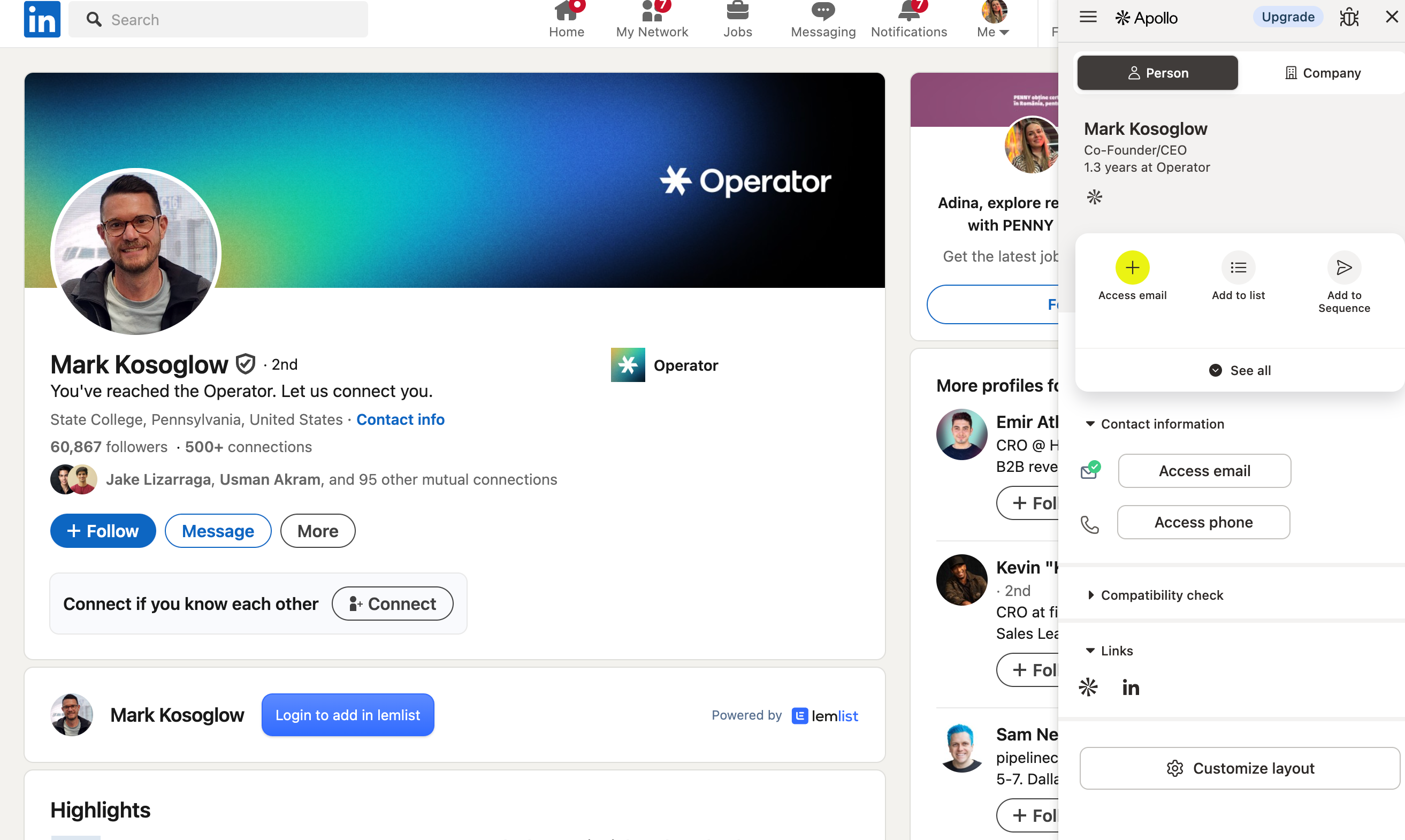
The Apollo.io Chrome extension is a lead prospecting tool that simplifies sales tasks and works on top of LinkedIn’s free account and Sales Navigator, providing access to verified emails and phones (credit-based), plus data about company employees.
It provides detailed company profile overviews, with in-depth insights and information about companies, including employee details and associated activities. It pulls these details from its database, which is sourced from LinkedIn, company websites, and other prospecting platforms.
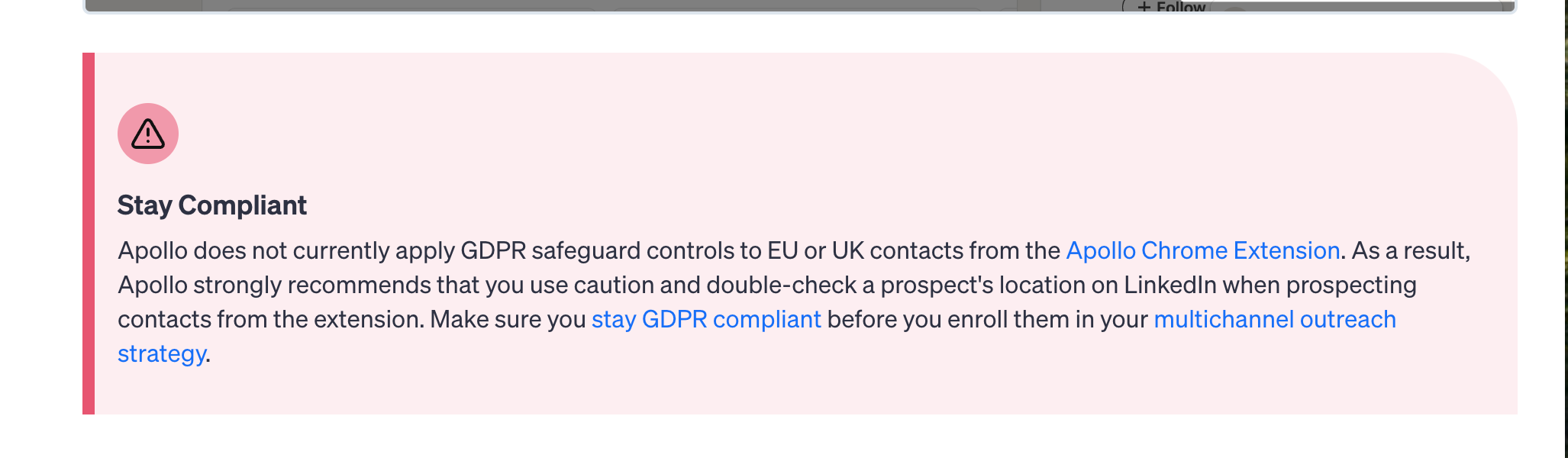
While it claims GDPR and CCPA compliance, Apollo does not currently apply GDPR safeguard controls to EU or UK contacts from the Apollo Chrome extension. As a result, Apollo strongly recommends that you use caution and double-check a prospect’s location on LinkedIn when prospecting contacts from the extension.
Key Chrome extension features:
- Auto-reveals verified emails and phones directly on LinkedIn
- Adds leads instantly to Apollo CRM and sequences
- Tracks email opens, clicks, and engagement
- Bulk captures prospect data from LinkedIn searches
| Pros | Cons |
| ✅ Access verified emails and numbers instantly on LinkedIn | ❌ Email and phone reveals are credit-limited (even on paid plans) |
| ✅ Saves time by enriching leads directly in workflow | ❌ Contact data, while vast, can sometimes be outdated |
Why sales reps choose Apollo’s Chrome extension: The extension provides comprehensive prospecting data and lead qualification directly on LinkedIn profiles. Sales teams appreciate the integrated approach that combines data extraction with immediate outreach capabilities.
Pricing
Pricing as of October 9, 2025: The extension works with Apollo’s free plan (limited monthly credits for LinkedIn emails and phone numbers and basic Gmail/Calendar features), allowing you to schedule appointments easily. Advanced features, such as CRM sync, bulk actions, and filters, are available on paid plans starting at $39 to $49 per month (billed annually).
4. Lusha Chrome extension – Best for quick contact enrichment
Best for: Fast contact enrichment on LinkedIn with CRM sync
G2 review rating: 4.3/5 (as of October 9, 2025)

The Lusha Chrome extension allows you to find contact details from its database while browsing, facilitating the sending of connection requests. Whether you’re on LinkedIn, a CRM platform, or even a website, Lusha shows B2B data while you browse supported pages.
If you’re looking for a Chrome extension with strong data compliance, Lusha stands out. It checks all the boxes: SOC 2, CCPA, GDPR, ISO 27701, and makes that trust factor clear from the start.
Everything, from exporting clean data to your CRM to saving leads, was smooth and didn’t require jumping between tabs. The interface is clean, and we liked being able to manage everything from a single panel. Lusha also assigns a grade score to each revealed email. Our first lookup returned an A+, meaning high confidence in deliverability.
Key Chrome extension features:
- Instantly reveals professional emails and phone numbers on LinkedIn
- Offers high-quality direct-dial phone number data
- Integrates directly with popular CRMs (Salesforce, HubSpot, Pipedrive, Zoho)
- Bulk prospecting from LinkedIn search results
- Auto-enriches contact profiles (job title, location, company info)
Pros and cons
| Pros | Cons |
| Bulk view (25 contacts) | Limited customer support |
| Email grade scoring | Limited free credits |
Choose Lusha’s Chrome extension if: you are looking for speed and simplicity for LinkedIn prospecting. The Chrome browser integration is intuitive, making it popular among sales representatives who need quick access to contact details while browsing.
Pricing
Pricing as of October 9, 2025: Free plan includes 70 monthly credits. Check current limits on Lusha’s site.
See our detailed Lusha Chrome extension review for feature analysis.
5. Saleshandy Connect Chrome extension – Best for email verification
Best for: Email verification and outreach sequences
G2 review rating: 4.6/5 (as of October 9, 2025)

If you’re looking for a LinkedIn prospecting tool that combines lead finding with email tracking and integrates with Google Calendar, Saleshandy Connect delivers solid functionality.
To get real value from it, we recommend setting up an email sequence first. You can build multi-step sequences, add prospects as you go, and track performance from one place.
It leans more into email engagement than just contact discovery. While the extension is decent, the real power lies in the dashboard. Together, they make a strong combination for SDRs or founders who want control over their pipeline without having to bounce between tools.
However, one downside of Saleshandy compared to other tools like PhantomBuster, Apollo, and Lusha is that you won’t get deep enrichment data, such as company revenue, tech stack, or phone numbers. If you’re looking for a full contact profile, you’ll need to pair it with another tool.
Key Chrome extension features:
- LinkedIn email finder with verified addresses
- Real-time email tracking with desktop notifications
- Direct integration with cold email sequences
- Bulk imports supported (limits vary by plan)
Choose Saleshandy Connect Chrome extension if: your team is email-focused and you prefer the extension for its verification accuracy and integration with email sequences.
Pricing
Pricing as of October 9, 2025: 7-day free trial. Paid plans start at $36/month, offering unlimited email accounts and a unified inbox.
6. ContactOut Chrome extension – Best for AI-powered messaging
Best for: AI-personalized email messages
G2 review rating: 4.5/5 (as of October 9, 2025)

ContactOut focuses on website domains and variety. When we tested it, the LinkedIn overlay surfaced three email types for a single contact, a Gmail, an att.net, and a work email. Prioritize work emails for B2B outreach. Depending on your outreach angle, that range can be useful, especially if one channel goes cold.
It also includes an unexpected but helpful feature: the “AI write personalized message” button. It drafts a quick, tailored message based on the profile below the contact info. It’s not a full email writer, but it can save time when you want to send something short and relevant without overthinking.
Key features:
- Reveals work, personal, and generic emails directly on LinkedIn profiles
- Option to find and reveal phone numbers
- AI-powered tool to write personalized outreach messages
- One-click export to Lists, ATS, or CRM platforms
| Pros | Cons |
| Easy LinkedIn overlay | Pricey premium plans |
| AI message writer | Limited phone data |
Choose ContactOut’s Chrome extension if: you are focused on personalized outreach and you want an extension with AI messaging capabilities.
Pricing
Pricing as of October 9, 2025: ContactOut’s free Chrome extension plan includes 5 emails, 5 phone numbers, and 5 exports daily, plus access to the search portal and premium trial. The $25/month Email plan adds unlimited emails, 300 exports, campaigns, a list builder, and all free features.
7. Hunter.io Chrome extension – Best for domain search and email finder
Best for: Domain-based prospecting, email verification, large-scale email discovery
G2 review rating: 4.4/5 (as of October 9, 2025)
The Hunter.io Chrome extension excels at finding professional email addresses when browsing company websites or LinkedIn company pages. It’s particularly useful for domain-based prospecting and email verification.
Key Chrome extension features:
- Find verified emails on company pages
- Validate deliverability instantly
- Export to CRM in one click
Why sales teams choose Hunter.io’s Chrome extension: The extension excels at finding professional email addresses when browsing company websites or LinkedIn company pages. It’s particularly useful for domain-based prospecting and email verification.
Use case example: A sales rep researching a target company uses the Hunter extension while browsing their LinkedIn company page to find all email addresses associated with the domain, then cross-references with individual profiles.
Pricing as of October 9, 2025: $34/month for domain searches and email verification.
8. Cognism Chrome extension – Best for premium B2B data
Best for: Premium B2B data
G2 review rating: 4.6/5 (as of October 9, 2025)

Cognism’s Browser Extension provides easy access to verified contact information from LinkedIn profiles and corporate websites. SDRs use it to generate contact data for LinkedIn Sales Navigator lists and prospect lists from websites. Cognism targets teams needing compliance-first data. Pricing is custom, expect enterprise-level quotes. Cognism’s data quality and compliance come at a cost, so it’s better suited to established sales teams or regulated industries.
The Cognism Sales Companion extension integrates with CRM systems and sales engagement tools (including Salesforce, HubSpot, Outreach, and more), allowing users to export data for streamlined workflow management.
Key Chrome extension features:
- Human-verified contact data with Do Not Call checks displayed on LinkedIn
- Intent data and buying signals shown directly on profiles
- GDPR and CCPA compliance with Do Not Call list checking
- International coverage with local phone number verification
- Integration with LinkedIn Sales Navigator for advanced prospecting
Choose Cognism’s Chrome extension if: You work in regulated sectors or run large sales teams and need clean, legally vetted B2B data at scale.
Pricing
Pricing as of October 9, 2025: Custom pricing based on requirements.
9. Wiza Chrome extension – Best for LinkedIn Sales Navigator integration
Best for: Large-scale email extractions from LinkedIn Sales Navigator
G2 review rating: 4.5/5 (as of October 9, 2025)

Wiza is built for bulk lead extraction, which significantly reduces manual work. It shines when you’re pulling large lead lists from LinkedIn or Sales Navigator. Think hundreds or thousands of contacts in a single session.
In that sense, it’s closer to Kaspr, especially in how it structures email credits. Free plan: 20 email credits/month (as of October 2025), which won’t take you far if you’re conducting daily prospecting.
What makes Wiza valuable is its built-in verification and filtering. You can sort leads by bounce risk, role, or industry before downloading, saving you time and protecting your sender’s reputation. Export to CSV or sync to HubSpot/Salesforce in two clicks.
Key features:
- Native LinkedIn Sales Navigator integration with bulk extraction
- Job change monitoring and alerts for warm outreach opportunities
- Bulk export capabilities for large prospecting lists directly from Sales Navigator
- Contact data verification and email finder functionality
Choose Wiza’s Chrome extension if you use LinkedIn Sales Navigator for prospecting. Some sales reps prefer it for its integration and job change monitoring. The tool can identify warm outreach opportunities when prospects change positions.
Pricing
Pricing as of October 9, 2025: You can try the Wiza Chrome extension by signing up with a free account, which gets you 20 free email credits. $83/month for unlimited email credits.
10. Lemlist Chrome extension – Best for multi-channel outreach
Best for: Multi-channel outreach
G2 review rating: 4.5/5 (as of October 9, 2025)
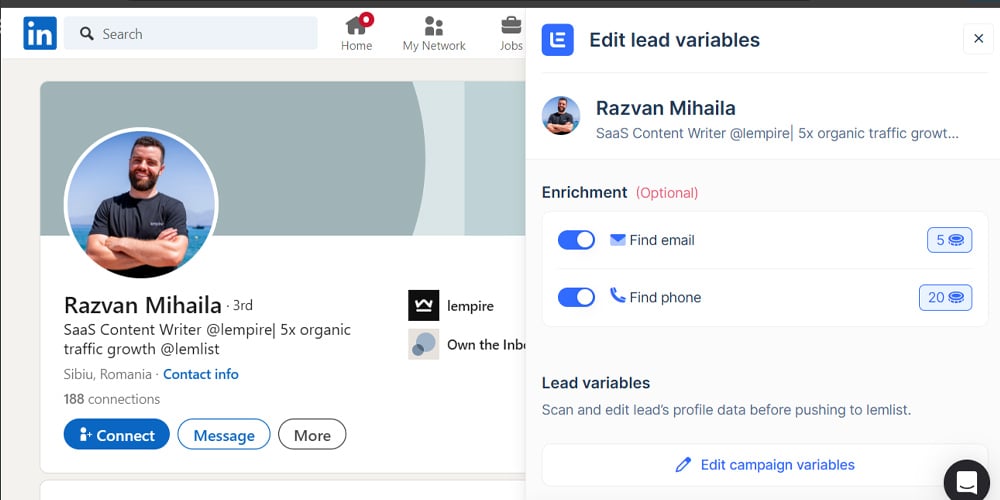
Lemlist’s LinkedIn Chrome extension is built for sales reps running multichannel sequences. It lets you combine LinkedIn messages, emails, and cold calls into one cohesive workflow. The extension also supports outreach beyond LinkedIn, enabling integrations with other social media platforms for multi-channel engagement. The extension supports enrichment and multi-channel sequencing, automatically feeding prospects into your existing campaigns.
Key Chrome extension features:
- LinkedIn contact extraction with immediate campaign enrollment
- Multi-channel campaigns combining LinkedIn, email, and video messages
- Video recording capabilities for personalized outreach directly from LinkedIn
- Email sequence creation and management from the extension
Choose Lemlist’s Chrome extension if: your sales team is focused on multi-channel outreach and prefers it for its ability to coordinate LinkedIn interactions, email outreach, and video messages in unified campaigns directly from LinkedIn profiles.
Pricing
Pricing as of October 9, 2025: $55/month per user.
When do Chrome extensions reach their limits?
Chrome extensions are great for individual work, but scaling past 100+ prospects/day is hard without standardized workflows and automation. Here’s why:
- Manual processing limits: Extensions require hands-on interaction for each contact, making it time-consuming and inefficient to manage 100+ daily prospects.
- Inconsistent data quality: Manual extraction leads to formatting inconsistencies and missing fields, which compromise CRM data hygiene and campaign effectiveness.
- Workflow isolation: Extensions find contacts, but many don’t cover verification and follow-ups, so teams end up juggling multiple tools.
- No team standardization: Individual browser-based tools prevent unified processes, reporting, and quality control across growing sales teams.
Pro tip💡: PhantomBuster’s click-triggered extension is the entry point to Automations that handle enrichment, routing to CRM, and sequenced outreach. These best chrome extensions can function as lightweight layers on top of your existing sales platform, enabling you to source and engage leads more efficiently.
The PhantomBuster LinkedIn prospecting playbook: Step-by-step LinkedIn automation for sales reps
Finding lead emails with a Chrome extension is where many reps begin. It’s quick. It’s easy. But alone, it doesn’t generate qualified leads. It generates raw data. And raw data doesn’t close deals.
What’s needed is a repeatable system, a step-by-step path that moves from initial profile extraction to enrichment to fully automated, multi-channel outreach. Below is a simple framework that shows how to build that system using PhantomBuster.
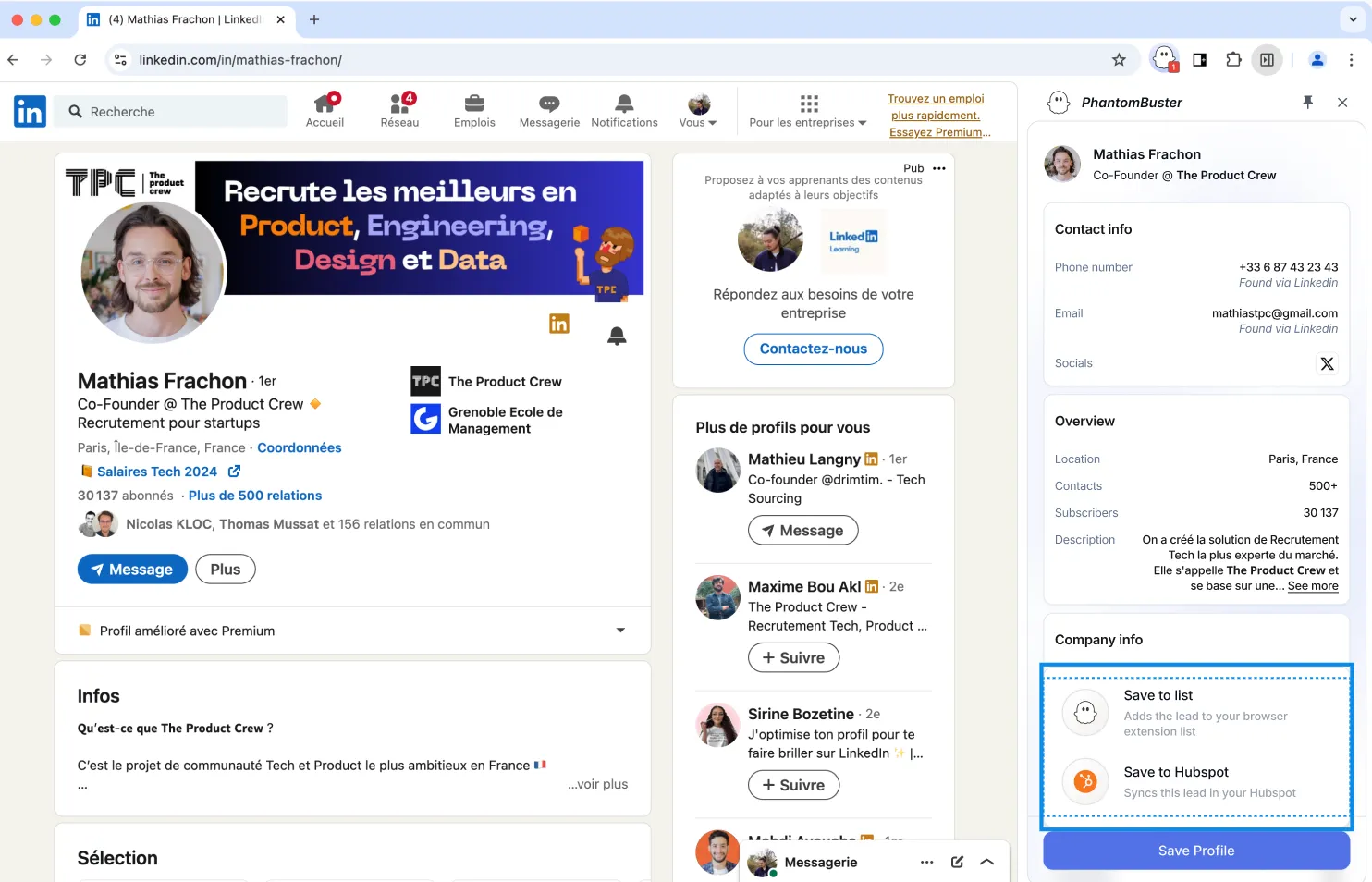
- Stage 1: Manual extraction: Begin by using PhantomBuster’s Chrome Extension to extract 20 to 30 high-fit profiles daily from LinkedIn. Manually review each one to confirm job title, company fit, and buying intent. This first step helps define what a “good lead” looks like before scaling up.
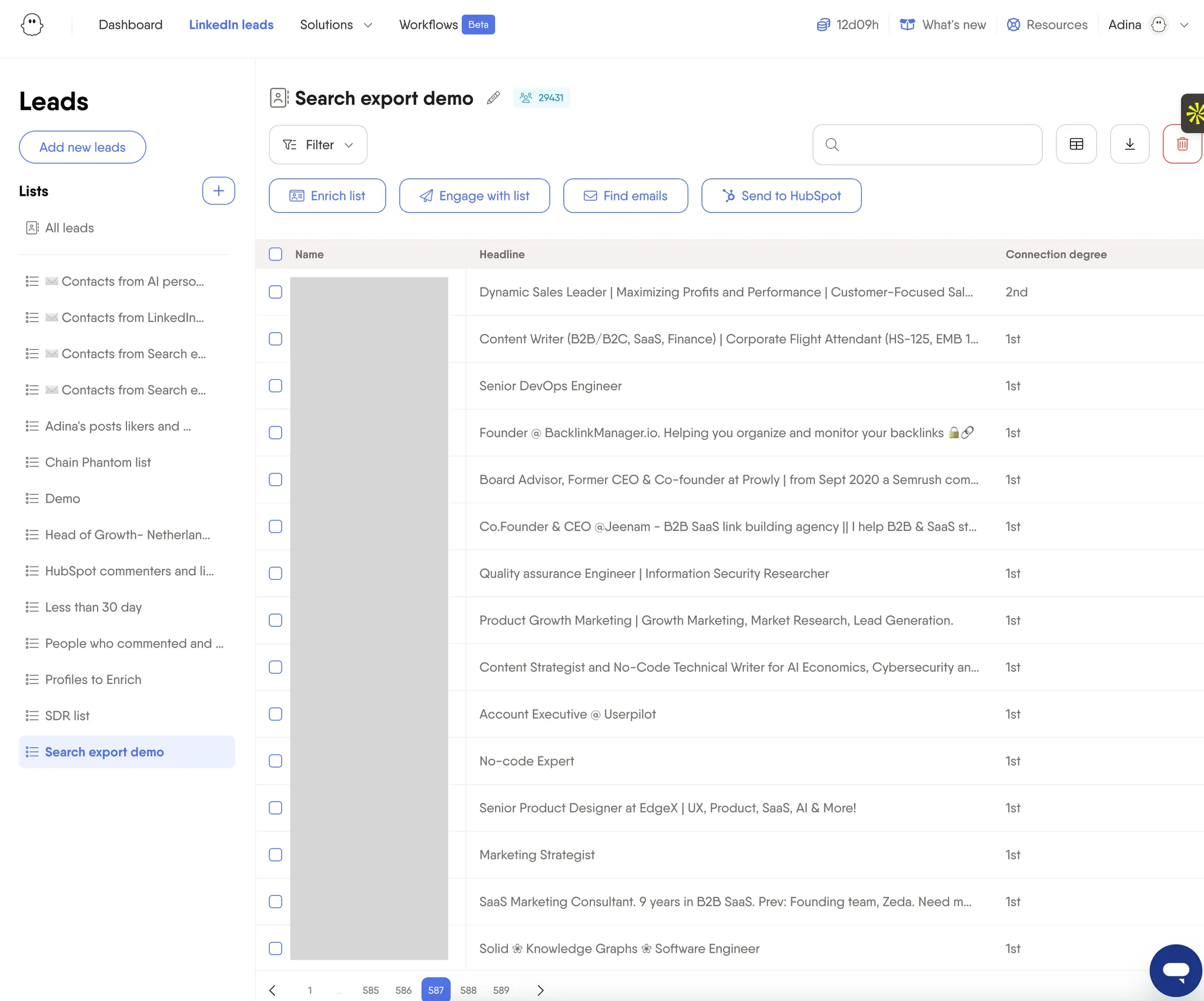
- Stage 2: Automated list building: Once the ideal profile is clear, automate lead collection. Use PhantomBuster’s LinkedIn Search Export automation, which exports results in near real time. You can copy a search URL and export the resulting profiles for your sales cycle, giving you a great starting list.
- Stage 3: Lead enrichment: By knowing details such as a lead’s job title, industry, or recent interactions, you can create customized messages that speak directly to their needs based on personalized insights. With the right data, you can start an automated qualification process that segments leads based on specific criteria. Use PhantomBuster’s LinkedIn Profile Scraper automation to enrich profiles with job title, industry, and recent activity.
- Stage 4: Workflow CRM integration: Sync enriched leads to your CRM or email platform using built-in integrations. Apply tags, trigger sequences, and assign owners automatically. The result? Richer profiles with context, not just contact info. For example, using PhantomBuster, you can sync your contacts inside HubSpot with data available in your exported lists.

- Stage 5: Advanced automation and social selling: Go beyond list building, and start sending connection requests, accepting invites, tracking engagement metrics and sending follow-ups using PhantomBuster’s LinkedIn Auto-Connect automation and AI-powered message personalization, then layer email and call steps. Combine these with email touchpoints and call scheduling to create a complete, responsive outreach system that moves leads through your pipeline with less manual effort.
Pro tip💡: Each step builds on the last. Start manually, then layer in data enrichment, integrations, and campaign logic until you’re running a lean, personalized sales machine.
How to choose the right LinkedIn Chrome extension
| Your Situation | Recommended Chrome Extension | Why |
|---|---|---|
| Individual SDR/BDR (1-50 leads/day) | PhantomBuster | Quick extraction, affordable pricing, easy setup |
| Phone-focused outreach | Kaspr | Best cell phone number accuracy, GDPR compliance |
| Email-heavy prospecting | Saleshandy Connect | Verified professional email addresses, deliverability focus |
| LinkedIn Sales Navigator users | Wiza | Native Sales Navigator integration, advanced filtering |
| Growth-minded teams with intent for organized workflow efficiency | PhantomBuster | Start with extension, scale to full automation tools |
| Small sales teams (50+ leads/day) | PhantomBuster | Comprehensive features, team collaboration |
| Multi-channel outreach | PhantomBuster and Lemlist | LinkedIn + email + video in unified campaigns |
| Enterprise/compliance focus | Cognism or Kaspr | Premium data quality, GDPR/CCPA compliance |
| Budget-conscious teams | Saleshandy Connect | Lowest entry price at $24/month |
| AI-assisted messaging | ContactOut | Built-in message generation and personalization |
Best practices for LinkedIn Chrome extensions
Chrome extensions can help you move faster on LinkedIn, but speed without structure leads to poor data, restricted accounts, and missed opportunities. To turn LinkedIn into a consistent sales channel, you need a smarter approach. Use these seven practices to keep your workflow smooth and safe:
- Verify contact data before outreach: Always double-check extracted emails and phone numbers to avoid bounces and protect your sender’s reputation.
- Respect LinkedIn’s limits: Keep profile views, connection requests, and messages within safe ranges.
- Use GDPR-compliant tools: For EU leads, ensure personal data is handled lawfully and transparently.
- Standardize list naming: Label lead exports clearly (e.g., “UK – CTOs – July”) so your team can search, filter, and reuse them with ease.
- Start manually before scaling: Use click-based tools first to understand the workflow, then move to automation once your targeting is dialed in.
- Integrate with your CRM: Push leads directly into HubSpot, Salesforce, or your preferred CRM to maintain pipeline management.
- Personalize every message: Use profile context to craft relevant, specific outreach. Avoid copy-paste requests that feel cold or generic.
FAQ
Is it legal to use LinkedIn Chrome extensions for sales prospecting?
Generally safer when you control each action (click-triggered). Always follow LinkedIn’s Terms and local laws. PhantomBuster is designed for responsible, user-controlled workflows.
Can using sales extensions get my LinkedIn account banned?
Risk increases when tools automate actions at scale without user control. Avoid tools that exceed LinkedIn’s limits. Stick to manual, user-controlled extensions to stay safe.
What’s the best extension for HubSpot or Salesforce users?
PhantomBuster and Apollo both offer CRM integrations. PhantomBuster takes it a step further by automating lead capture into HubSpot with enriched data.
Can I find contact details for any LinkedIn prospect using extensions?
Not always, but success rates are typically high. Results depend on profile visibility, data availability, and whether prospects have made their contact information publicly available. Some users may restrict the visibility of their profiles, and some contact details are sourced from external databases, which may affect their accuracy.
Can I use multiple extensions at once?
You can, but it’s usually better to choose one that covers most needs, especially for outreach. Running too many can slow your browser and increase security risk.