
Imagine turning every prospecting effort into meaningful connections, crafting emails that spark responses, and consistently reaching the right prospects to fuel your sales funnel.
These are the wins top salespeople achieve with the right approach.
In this guide, we’ve pulled expert-curated prospecting tips for every stage to build a successful sales pipeline of qualified leads in 2025.
Tips for refining your prospecting strategy (beyond the classic ICP playbook)
When most people think about targeting, they stop at creating an Ideal Customer Profile (ICP)When most people think about targeting, they stop at creating an Ideal Customer Profile (ICP). By focusing on ICP only, you are limited to criteria like Job titles, company size, and industry. These are helpful starting points, but they’re not enough.
To connect with high-intent prospects and enhance your sales strategy, you must dig into what they care about, what keeps them stuck, and what makes them act.
Here’s how to sharpen your targeting beyond the basic ICP playbook with some compelling sales prospecting examples:
Focus on the prospect’s pain points first
Potential buyers don’t wake up thinking about your product. They’re thinking about the problems slowing them down.
Spend time identifying three to five core pain points your ideal prospects face.
- “I spend hours manually reconciling payments across tools.”
- “We keep hitting chargeback issues and can’t trace the root cause.”
- “There’s no way to issue refunds or credits at scale without emailing support.”
Then, test different pain angles in your outreach. Pay attention to pain points that trigger more engagement in your messages.
As Jovan Shojlevski, CEO at Mailer, highlighted, you are probably solving the wrong problem if you are not getting replies.
Pro tip💡: Don’t focus on pitching your solution right away; instead, explore various sales prospecting methods. Make your prospect feel the pain vividly and specifically before offering a way out.
Use AI and community listening to uncover hidden insights
Uncommon insights drive uncommon sales results. Prospects often organically reveal their real pains, frustrations, and desires inside niche communities.
Charlotte Schmitt, Founder of Octolens, says, “Early traction came from helpful engagement in Slack, not cold pitches.” Listening earned trust first, before sales occurred. She shared that Octolens gained early adopters simply by being useful in Slack communities before mentioning their product.
Does it make sense to embed the post below?
Spending time inside these communities helps you catch signals and build credibility before you send a sales pitch.
Next, you want to listen actively for what is unsaid. Look for recurring frustrations, emerging desires, and the hidden needs your customers may not fully articulate. Reach out to them for interviews to find these hidden needs.
AI helps scale this. You can run sales call transcripts through ChatGPT to uncover patterns in objections, fears, and unmet needs.
Example prompt:
“Analyze this file. List five recurring complaints, five desired outcomes, and three emotions customers express. Include direct examples.”
The more hidden signals you capture, the faster you refine your targeting.
Map your prospect’s tech ecosystem
Most outbound strategies stop at targeting by title or job change. To target smarter, you need to understand your prospect’s environment.
Jan Rasmussen Mitjana shared that growth is driven by layering subtle, actionable signals together. One of the highest-impact signals is technographic intent, meaning knowing what tools your prospects already use.
Here’s Why it Matters:
- Complementary tech: If they use tools you integrate with, pitch yourself as the natural next step.
- Competitive tech: If they use a rival, look for dissatisfaction and offer a better option.
So, map your prospect’s influence network in the company. Who’s the champion? Who might block the deal? Tools like Clay enrich accounts with technographic + role-based contact data.
Example prompt you can use inside Clay:
“For each account, list the tech stack, highlight complementary or competitive tools, and map three to five contacts likely involved in the buying decision.”
Treat your ICP as a data-backed, evolving idea.
Sales professionals know that an ICP is not something you set once and forget.
The most successful companies validate their ICPs through real engagement signals, conversion patterns, and customer behavior before doing outreach.
In the early stages, this involves running your lead’s information against the lead qualification checklist you create
The validation checklist to focus on includes:
- Engagement data like downloads, demo requests, and feature usage
- Win or loss analysis to document why deals are won or lost.
- CRM metrics such as lead-to-opportunity and opportunity-to-close rates by segment
But you need data to validate, so you need the following:
- Firmographics like industry, revenue, and employee count
- Technographics like tech stack and IT budget
- Behavioral signals like webinar attendance and content downloads
- Sales call insights around pain points.
- Support ticket patterns showing recurring post-sale issues
Tools like Gong and ChatGPT can help uncover patterns.
For example, prompt ChatGPT with: “Analyze our last 100 closed-won deals. What traits did they share?” Run this process quarterly. Cluster accounts by deal speed, update your ICP based on real patterns, and adjust your targeting accordingly. One tweak could lead to faster closes and better-fit customers.
Internal AI prompt example:
“Analyze our last 100 closed-won deals. Identify three uncommon characteristics customers share with greater than 120 percent Net Revenue Retention. Compare against closed-lost deals and recommend ICP updates.”
Tips for finding high-intent prospects efficiently
Not every prospect is primed to buy immediately. Some are just browsing, while others are ready to buy. These ones are high-intent prospects, and they leave clear clues; think of these clues as digital footprints.
These intent signals, like frequent website visits, downloading resources, or researching competitors, reveal a buyer’s readiness.
Layer ‘low-intent’ signals for early engagement
When leads show high intent, everyone’s already competing for their attention. Instead, start earlier in the funnel by tracking low-intent signals. These signals are subtle signs of curiosity, like likes and comments on LinkedIn posts related to your industry or competitors.
They don’t scream “ready to buy,” but show timely interest.
A great tactic to find these warm leads is to look for intent data, such as searching for people commenting on a competitor’s post on LinkedIn.
We recommend using PhantomBuster’s LinkedIn Post Commenter and Liker Scraper to find and export these contacts. Drop in a LinkedIn post URL, and it automatically pulls a clean list of engaged people.
When you run the automation, you’ll get a prospect list that is prime for social selling, including their comments and LinkedIn profile URL, ready to export to a CSV, enrich further, or contact.
Pro tip💡: Jan Rasmussen Mitjana notes that no single signal drives action—the combination creates momentum. Pre-awareness engagement is part of that mix, but most teams overlook it.
Use PhantomBuster as a core data extraction layer
You can’t rely on manual copy-paste or incomplete exports if you’re serious about outbound success. You always need clean, structured data to prime your messaging.
PhantomBuster solves this by automatically acting as your data engine, pulling lead information from multiple social platforms. It helps streamline the first stage of your sales prospecting efforts: lead extraction.
Whether building a new lead list or enriching your CRM, you can use PhantomBuster automation tools to extract real-time insights from where your prospects are most active.
- Extract profiles of people engaging with posts related to your market with PhantomBuster’s LinkedIn Post Likers & Commenters.
- Export full lead lists from Sales Navigator or regular LinkedIn searches with PhantomBuster’s LinkedIn Search Export.
- Pull members of niche groups to discover community-driven leads with PhantomBuster’s LinkedIn Group Members Export.
- Monitor when contacts change roles and trigger timely outreach with HubSpot Contact Career Tracker
- Extract full name, title, company, education, and more from LinkedIn profiles at scale with PhantomBuster’s LinkedIn Profile Scraper.
Pull members of niche groups to discover community-driven leads with PhantomBuster’s LinkedIn Group Members Export.
- Monitor when contacts change roles and trigger timely outreach with HubSpot Contact Career Tracker
- Extract full name, title, company, education, and more from LinkedIn profiles at scale with PhantomBuster’s LinkedIn Profile Scraper.
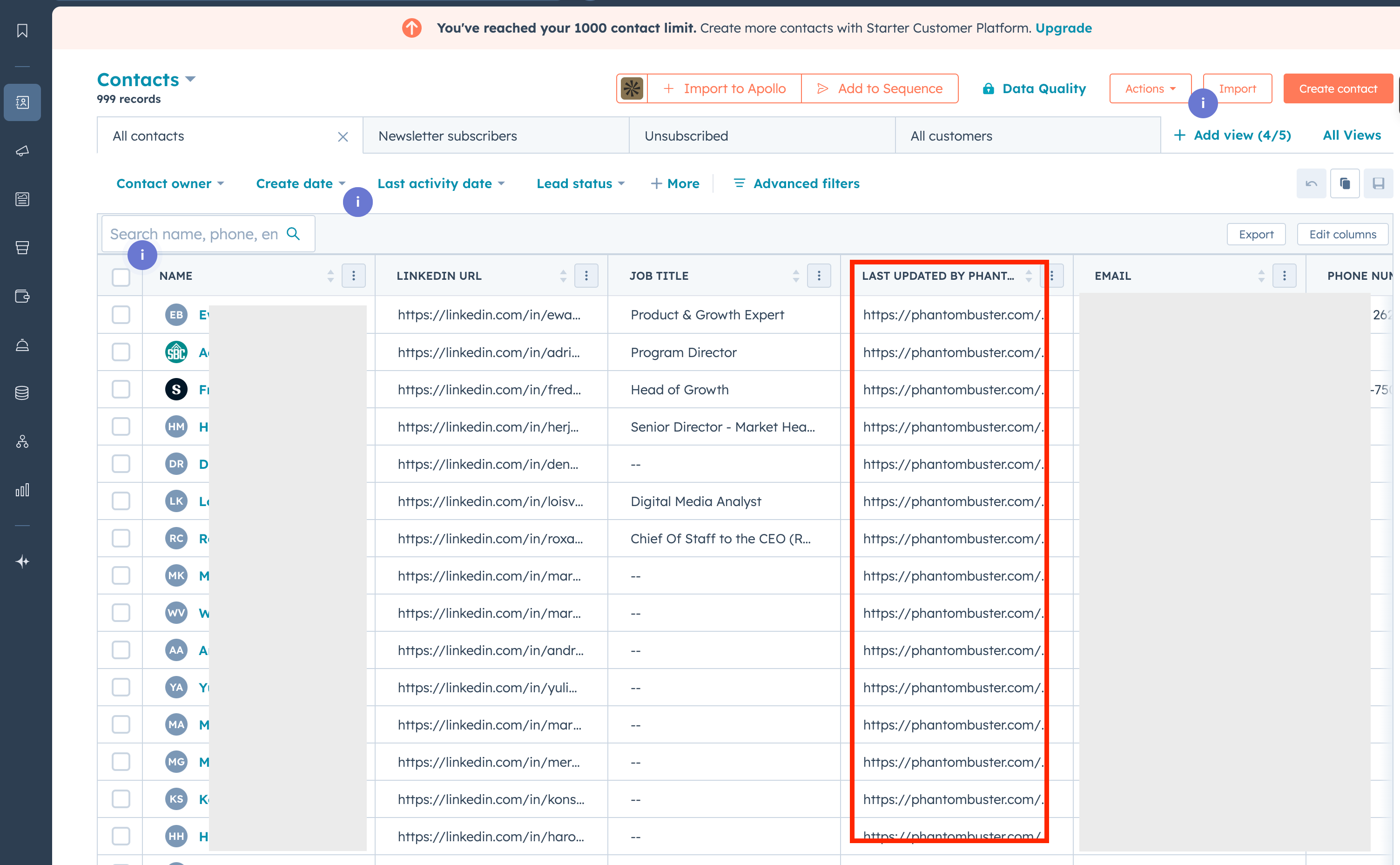
Once these data points are extracted, they can automatically be sent into your CRM, like HubSpot. So instead of juggling tools or skipping over cold leads, you now have a live feed of prospects, pre-qualified and ready for action.
Ask for specific referrals during customer calls
Referrals from happy customers win you more credible deals and increase close rates quicker, shortening the sales cycle.
Steven Van Bellegham once said, “I dream of a world with happy customers that share their excitement with all of their friends and family.”
Instead of waiting for generic recommendations, be proactive and specific during customer calls to secure warm introductions that drive pipeline growth.
As Jessica Perri puts it, “When on a call with a customer, bring up someone else in the org and ask for a formal intro. If they introduce you and you get a meeting, you owe me $5 for this pipeline-building tip.”
Pro tip 💡: Prep for the call by researching the customer’s org chart or LinkedIn connections to pinpoint potential referrals. Follow up with a thank-you note and keep the customer updated on the outcome to maintain trust.
Build an ‘omnichannel’ data engine for full market visibility
Using only one data source, like LinkedIn Sales Navigator, leaves gaps in your market view.
To capture your total addressable market (TAM) methodically, you need to integrate multiple data streams for a complete picture.
Jatin Singh claims you’ll leave up to 40% of revenue on the table if you use only one provider for prospect data.
And we couldn’t agree more with him.
He recommends going Omnichannel on Data — LinkedIn Sales Navigator premium + PhantomBuster for Live, Qualified data. Start with LinkedIn for targeting specific roles.
Here’s another example by Ilan Asseo. He layers multiple tools to close the gap. He accesses quality data by using Clay, Sales Navigator, Kakiyo, Attio, RB2B, PhantomBuster, and Claude for various use cases.
Monitor trigger events proactively
“The best teams layer subtle, actionable, and high-impact intent events to reach prospects at the right time”, says Jan Rasmussen Motjana, Enterprise AE at ColdIQ.
Tracking these events positions you to engage prospects at peak readiness.
Some of these trigger events include:
- Funding Rounds: New funding often means new budgets. Set up Crunchbase alerts to trigger CRM workflows and task reps with tailored outreach (e.g., “Congrats on the Series A—here’s how we can help scale”).
- Tech Stack Changes: When prospects adopt or drop tools, it signals shifting needs. Use Wappalyzer alerts to trigger CRM workflows and timely engagement.
- Pricing/Case Study Page Visits: High-intent leads often show up here. Monitor potential buyers’ visits closely to trigger fast, personalized follow-ups.
- G2 Category Views: G2 viewers are in research mode. Route alerts to your CRM and send targeted demo or trial offers to stay top of mind.
- Job Changes: New hires or role switches, especially decision-makers, create openings for outreach. Use PhantomBuster’s HubSpot Career Changer to automate LinkedIn job change tracking.
- Likes and Comments on Social Posts: Monitor engagement on LinkedIn or other platforms to spot prospects interacting with your brand or industry content. Use PhantomBuster’s LinkedIn Post Likers and Commenters Scraper to track who engages with your posts.
Tips for researching prospects for personalized outreach
Research shows that 71 percent of consumers expect companies to deliver personalized interactions.
But before you personalize your outreach messaging, follow these tips below.
Go beyond surface-level research – find common ground and context
“Doing thorough research before reaching out to potential clients can make all the difference in sales success,” says Mary Hanna-Flor.
Start by finding common ground: a shared alma mater? Mutual connection? Or a niche community?
Dive into their company’s recent news. Think product launches, funding rounds, or thought leadership posts and teardowns.
A quick, specific shout-out to a recent achievement (e.g., “Congrats on your new AI tool launch!”) proves you’ve done your homework and care about their success. It’s not flattery; it’s respect for their work.
Check recent activity for conversation starters
Dive into your prospect’s latest LinkedIn activity, like posts, comments, or shares. Did they celebrate a company milestone, like a product launch or funding round? They could share a thought-provoking take on an industry trend or comment on a post that aligns with your expertise.
For example, instead of a generic “I’d love to connect,” try:
“Just saw your post about your team’s innovation and I’m impressed by your focus on [specific detail].”
This opener feels personal, builds instant rapport, and sets the stage for a meaningful exchange.
To make this process faster, leverage PhantomBuster’s AI LinkedIn Message Writer with this tool. you can automate the process while keeping it highly tailored.
It uses the context you provide, along with data from LinkedIn profiles, to craft messages that feel personal. You can set tone, length, and structure rules to ensure the messages meet your goals.

Here is an example of a prompt you can use:
“Craft a conversational LinkedIn message based on this post: [insert post URL]. Reference a specific detail from the post, align it with my expertise in [your field], and suggest a low-pressure next step, like a quick chat or sharing a relevant resource.”
Automate gathering personalization data points at scale
Relying solely on manual research limits both speed and accuracy. To build more precise outreach segments, use automation to consistently gather relevant data points before contacting prospects.
You’d need a tool to manually research data points like sections, headlines, bios, job descriptions, and emails.
We recommend using PhantomBuster’s LinkedIn profile scraper to extract ‘About’ sections, headlines, recent posts, job descriptions, etc., across your list. When you feed this structured data into your outreach tools/CSVs to enable scaled personalization based on real profile information.
Tips for qualifying leads rigorously
Effective lead qualificationEffective lead qualification is essential for outbound sales, ensuring sales reps focus on high-potential prospects. Here are the best ways to do it.
Implement a lead scoring system in your lead qualification process
Lead scoring is a critical methodology for qualifying outbound leads. It helps you determine each lead’s potential value and likelihood of converting into a customer.
Here’s how it works.
- You assign each lead a numerical score based on their characteristics, behavior, and how closely they match your Ideal Customer Profile (ICP). Leads with higher scores are considered more qualified and sales-ready.
While you can score leads manually, we strongly recommend using an automation tool. This makes the process much faster, more consistent, and more objective.
- PhantomBuster’s AI LinkedIn Profile Enricher allows you to automate lead scoring directly from LinkedIn profile data. You provide a custom prompt that defines your scoring criteria, and the AI analyzes your lead list, assigning a score to each profile.
Let’s say you sell sales intelligence software. Your ideal customer is a Sales Director or VP of Sales at a mid-sized B2B tech company. Here’s an example prompt you could use:
“Analyze each LinkedIn profile in the provided list. Assign a lead score from 1 to 5 (5 being the highest) based on their likelihood of being interested in sales intelligence software. Consider these factors: Job Title: Give higher scores to profiles with titles like “Sales Director,” “VP of Sales,” “Head of Sales,” “Sales Operations Manager.” Give lower scores to titles like “Sales Intern” and “Account Executive.” Industry: Prioritize profiles that work at B2B technology companies. Company Size (from the LinkedIn Company Page): Favor companies with 50-500 employees. Keywords in Profile: Give higher scores to profiles that mention keywords like “sales intelligence,” “lead generation,” “prospecting,” “sales automation,” “CRM,” or names of competitor tools. * Location: North America
Return the lead score in a new column.”

Frame the budget conversation collaboratively.
Nobody likes being cornered with “What’s your budget?” It can feel like a demand. Instead, frame the conversation as a partnership to uncover what works best for them.
As sales expert Enkeleida Hajdini advises, try this: “To tailor our proposal to your goals, it’d be helpful to understand any constraints you’re working within, whether that’s timing, scope, or budget.”
By leading with empathy, you signal you’re on their side. It invites open dialogue, keeps the tone warm, and sets the stage for a practical and tailored proposal. The result? A conversation that builds trust, not tension.
Analyze your process for qualification ‘leaks’
A bloated pipeline can mask weak opportunities. As Noha Shaaban says in this post, “Go back 30-90 days. Revive cold leads”. Auditing your process reveals where leads slip away.
Map your funnel stages and pinpoint drop-offs. Are you letting shaky prospects in too early? Do deals stall at a specific step, like pricing or approvals?
These bottlenecks signal qualification gaps. Tighten criteria where needed. For example, tell reps to focus on prospects with real potential. And no, this isn’t over-filtering; it’s about aligning your process to chase the right deals, saving time, and boosting close rates.
Use the ‘Reverse Elevator Pitch’ to qualify need and urgency
Pitching upfront can feel desperate for some sales reps, especially when you are unsure if the lead is qualified.
Good news? You can get prospects to sell themselves to you so that you can spot your high-potential zone.
Mary Beth Hazeldine calls it the reverse elevator pitch, and she suggests asking sharp questions to uncover need and urgency: “What’s your toughest challenge here?” “Why is solving this a priority now?” “How would this solution move the needle for you?”
You gain insight into their priorities and decision drivers without pushing. Better yet, they clarify their reasons to act, making your qualification sharper and their buy-in stronger.
Tips for executing your outreach strategy
Whether you’re sending cold emails, LinkedIn DMs, or follow-ups, how you deliver your message can make or break your results.
Below are proven tips to help you execute your outreach strategy with precision, personalization, and consistency.
Test sending LinkedIn DMs on weekends
As Jessica Perri notes in this post, weekends can be a goldmine for LinkedIn DMs. She says: Send ’em! Get off IG and out of other people’s DMs and get in your prospects on the weekend with less inbox clutter and more prospect attention.
Test sending a small batch of thoughtful messages on Saturday or Sunday. However, it’s easier said than done, as you can easily forget.
Automating your outreach saves time and effort so your sales team can stay on top of their follow-ups without doing it manually.
With the LinkedIn Outreach automation, sales representatives can automate the process of sending a connection request, an introduction message, and up to three follow-up messages.

Keep cold emails concise (25-50 words) and valuable
Some cold emails suck — Messages that feel weird, no research, vague claims, fake personalisation and gibberish.
Gregory Martigoni asked 40+ CEOs which cold emails they respond to, and the highlights are interesting. These CEOs placed a significant emphasis on emails that understand their pain points and give relevant examples.
Gonçalo Julião recommends: Cold emails work best with 25-50 words.
Use a 2–3 word subject line to spark curiosity or highlight value, and make the first sentence a mobile-friendly hook. A tight structure that hints at problem, benefit, and call-to-action.
Always provide meeting times in the prospect’s time zone
Rebekah Brown recommends always proposing meeting times in the prospect’s time zone.
You can do this manually (e.g., “10 AM PST / 1 PM EST”) or with tools like Calendly or Chili Piper that auto-adjust. This small step streamlines booking and signals you’re attentive to their convenience.
Ensure email deliverability with verified addresses
Bounced emails sink even the best campaigns. Make you verify email addresses after list-building to ensure deliverability. It depends on the email finder tool you are using and if it embeds verification into its system.
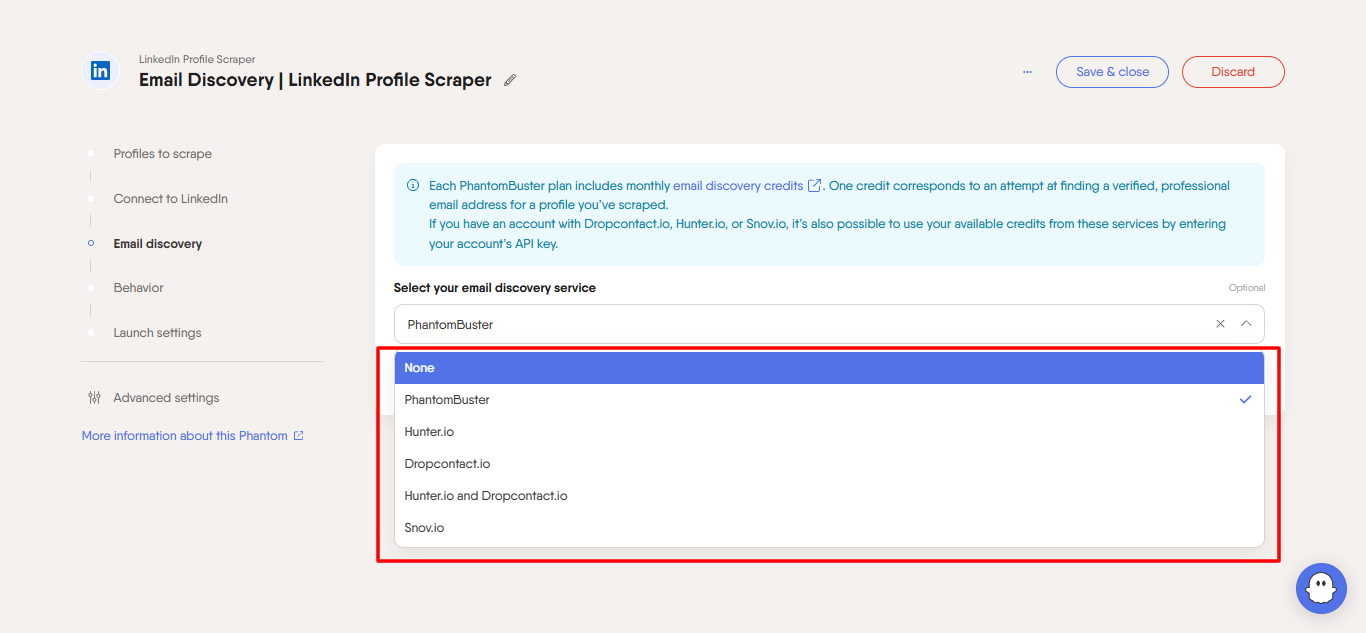
Extracting verified emails boosts your email deliverability and targeted outreach, but doing it manually is time-consuming.
Try out the PhantomBuster’s LinkedIn Profile Scraper, it automatically visits profiles on your list and uses a waterfall enrichment process to uncover emails. If an email isn’t found on LinkedIn, it sequentially checks Icypeas and Dropcontact to maximize match rate and accuracy.
Pro tip: PhantomBuster is also rolling out a Chrome extension for direct email discovery.
Tips for mastering persistent and valuable follow-up messages
According to data by Belkins, the first follow-up email is the most effective, boosting the reply rate by 49%.
To increase your chances of getting a response, you must learn how to craft consistent follow-up messages worth replying to.
Revive cold leads with a direct “breakup” email
When a prospect has gone cold after several follow-ups, send a polite breakup email instead of chasing endlessly.
Business Development expert Noha Shaaban highlights a simple message like “Should I close your file?” often triggers surprising responses.
Here’s an example of a breakup email:
Subject: Closing the loop
Hi [First Name],
I have not heard back, and I understand entirely if priorities have shifted. Should I close your file for now?
Thanks again for considering us. I am happy to reconn, etc., when the timing is better.
A direct, respectful note lets you move on faster while keeping the relationship open.
Structure follow-up across multiple channels
If you only follow up through email, you miss a significant opportunity to reconnect. Prospects do not all respond to the same medium. Some ignore emails but will reply on LinkedIn. Others are more likely to respond to a call or a voice note.
Gonçalo Julião, GTM expert, emphasized the importance of a multi-channel cadence because people respond differently across email, LinkedIn, and calls.
A simple multi-channel sequence you can use:
- Day 1: Initial email
- Day 3: LinkedIn connection request
- Day 5: LinkedIn message
- Day 8: Phone call or voicemail
- Day 10: Breakup email if no engagement
You can automate the sequence inside your CRM, like HubSpot, or sales engagement tools like Outreach.io or Apollo.
Rotating channels makes it harder to ignore and keep your persistence valuable without being spammy.
Tips for automating and scaling the sales prospecting process
Automated sales prospecting simplifies how sales teams find and engage potential customers.
In fact, 83% of sales rep say AI is effective say AI is effective for recognising and responding to buyers’ emotions.
Here are some top use cases for sales reps to boost their prospecting process.
Leverage AI lead enrichment to prioritize high-quality leads
Lead enrichment tools can help you make smarter decisions when building your prospecting lists.
They pull additional information about your leads, giving you deeper insights. This extra data allows you to focus on the most promising opportunities.
Here are some practical examples:
- Add job titles, industries, or company sizes to your lead database.
- Spot decision-makers in a company to tailor your outreach.
- Find updated contact information or social media profiles.
AI-powered tools like AI SDRs can streamline this process, saving you hours of manual research.
For example, AiSDR can book meetings with your top prospects using LinkedIn activity and HubSpot data.
It prioritizes leads that align with your Ideal Customer Profile (ICP) so you can focus on those most likely to convert.
Qualify your leads using AI-powered lead scoring
Lead scoring helps you decide which leads are worth pursuing.
With AI, this qualification process becomes faster and more accurate. AI analyzes your data to score leads based on their conversion likelihood, so you can focus on the right prospects.
Try out PhantomBuster’s AI LinkedIn Profile Enricher to simplify this step.
It uses AI to analyze profiles and assign scores according to your criteria, such as job changes, LinkedIn activity, or company relevance.
For example, if a lead matches your ICP and recently engaged with your competitor’s post, they’d receive a higher score.

AI-powered lead scoring lets sales teams prioritize effectively without second-guessing their choices so that they can spend more time on meaningful conversations with top prospects.
Leverage AI to personalize your sales messages
Reps customize 58% of all outgoing content, and spend up to 12 hours each week personalizing these messages by customizing pre-defined templates or manually creating outreach from scratch.
Personalized messages grab attention and improve response rates, which is crucial for effectively contacting potential customers. AI tools simplify this process, letting you create tailored outreach messages quickly.
These tools can analyze data from LinkedIn profiles, past interactions, and other sources to suggest relevant content for each prospect.
For example, PhantomBuster’s AI LinkedIn Message Writer helps you craft custom LinkedIn messages in seconds.
You can set parameters like tone, length, and key details to include (e.g., company name or shared connections).
💡 Need ideas? Check out our AI Prompt Guide for tips on creating prompts that get results
Simplify your lead management by automating data entry
Manually entering lead details into your CRM is a time sink—and a source of errors. Automating this saves time and keeps your data accurate.
Illan Asseo recommends PhantomBuster for lead extraction — he says: He uses PhantomBuster to extract thousands of targeted leads from LinkedIn.
Try using PhantomBuster’s HubSpot Contact Data Enricher to streamline this workflow. It connects to your HubSpot account and automatically enriches contacts with LinkedIn profile details.
For example, it can fill in missing job titles or skills to your CRM records so you have complete data.
If you need more automation for repetitive tasks, AI sales assistants like AiSDR can also handle everything from updating contact lists to scheduling follow-ups so your team can focus on closing deals instead of managing data.
Sales prospecting FAQs
What is an Ideal Customer Profile (ICP)?
An Ideal Customer Profile (ICP) describes the type of companies that benefit the most from your product or service. These are the best fit for your solution and tend to be your best customers, bringing the highest value to your business.
What is sales prospecting?
Sales prospecting is the process of identifying and contacting potential customers. Sales teams use a proactive outbound approach to manage and develop their lead pipeline.
What is the difference between sales prospecting and lead generation?
Sales prospecting is a proactive outbound approach sales teams use to manage and develop their lead pipeline. In contrast, lead generation typically involves creating leads through marketing campaigns or cold outreach.
What is the difference between a lead and a prospect?
A lead is an unqualified contact who has entered your database through marketing or sales efforts, typically at the early stages of the sales funnel. Whereas, a prospect is a qualified lead who fits your ideal customer profile and has the potential to become a paying customer
In short, all prospects are leads, but not all leads are prospects.
What are some of the best sales prospecting tools?
The best tools for outbound and inbound sales prospecting are: PhantomBuster, Apollo.io, LinkedIn Sales Navigator, ZoomInfo, Lusha, Hunter.io, Clearbit, Leadfeeder, Seamless.AI, and Cognism. These tools effectively carry out sales prospecting techniques.
How many touchpoints does it take to reach a prospect?
The sales process is not always linear. Depending on your industry and audience, it typically takes between eight and twelve touchpoints to connect with a prospect successfully. A touchpoint could be an email, LinkedIn message, phone call, voicemail, or even an event interaction.
Brevet notes 80% of sales need 5+ follow-ups, yet 44% of reps stop after one. A persistent, multi-channel sequence keeps you at the top of your mind without overwhelming you and wasting your prospecting efforts.
Is cold outreach dead?
No. Cold outreach is not dead. Poor, generic cold outreach is. Buyers still respond to cold emails, cold calls, and LinkedIn messages when they are highly targeted, personalized, and based on real buyer pains. Make your emails personal, tie them to their specific pain points, and deliver value to cut through the noise of other generic outreaches.