
It’s 2026, and sales success no longer depends on headcount and volume. Hiring SDRs, sending more emails, and pushing connection requests isn’t the only way to win.
A big part of that shift comes from how sellers in 2026 work with smaller budgets, leaner teams, and rising expectations.
Our State of Sales on LinkedIn for 2026 report shows that 81% of sellers work in teams of five or fewer, with a huge chunk operating solo. At the same time, 80% already use automation, and heavy AI users are 3.5× more likely to book more than five meetings per month.
In a nutshell, the teams winning on LinkedIn are pairing automation with intention and using AI-powered workflows to scale relevance, not noise.
In this guide, we’ll take a closer look at how solo sales teams can successfully scale outreach with PhantomBuster’s automations.
Small teams are the norm now—and that’s your advantage
Our data doesn’t describe a world dominated by big sales teams. It paints a completely different picture:
- 81% of respondents are in teams of ≤5.
- 38% operate completely solo.
So, if you’re a founder, consultant, agency, or lone SDR, you’re not the exception. You’re the median.
The constraint isn’t your size; it’s that you’re still operating with a 2016 mindset.
How to think about “scale” when you don’t have headcount
For a one-person team, scaling outreach is not “sending 500 connection requests per day.”
Instead, it’s about:
- More touchpoints: The right prospects see you via comments, DMs, and connection requests every week.
- Higher relevance: Your messages reference a recent post, shared connection, or role change in the opener.
- Less manual admin: No more copy-pasting LinkedIn data into your CRM or spreadsheet.
- Predictable system: Your pipeline moves even when you’re on calls all day.
How PhantomBuster helps achieve scale
PhantomBuster’s role here isn’t a shortcut or trick. It’s a cloud-based automation platform that connects multiple capabilities in one workflow: extract a search → enrich with AI → draft messages → schedule outreach → sync CRM.
You use it to:
- Extract LinkedIn data for you.
- Use AI to enrich and score prospects.
- Write personalized messages at scale.
- Power consistent outreach campaigns.
The rest of this guide shows how to wire it all up.
Our data shows relevance beats volume, and that’s your advantage as a small team
Mass templates, generic sequences, and broader targeting: such enterprise sales tactics don’t work for small teams.
Our data shows why that’s self-defeating:
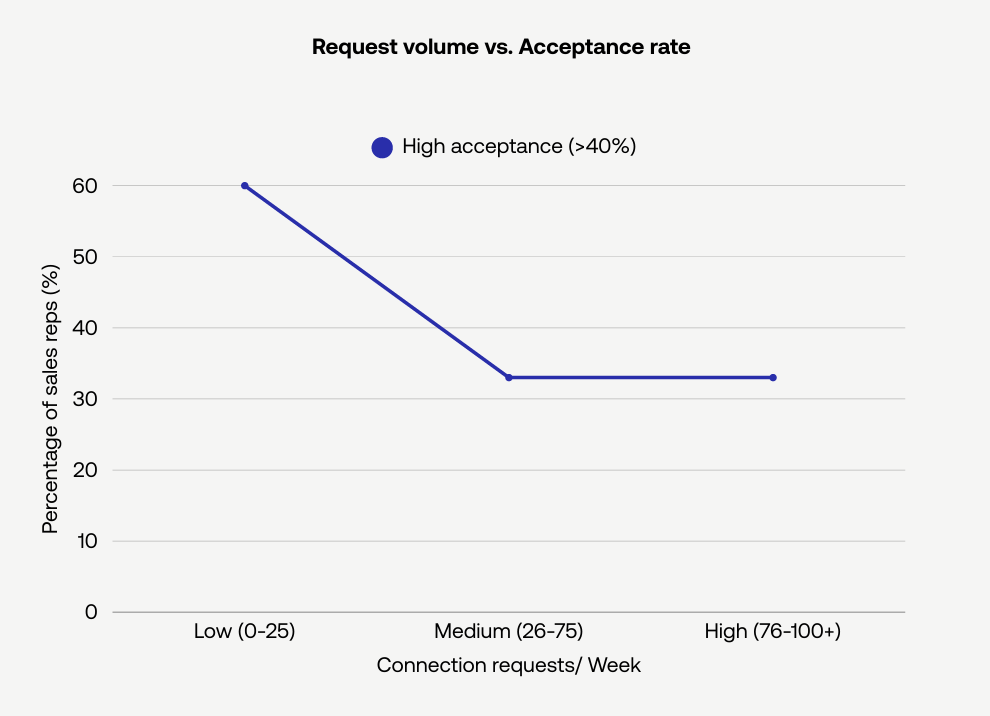
- Reps who send fewer than 25 connection requests per week are almost 2× more likely to hit strong acceptance rates (≥40%) than those who blast 76–100+ requests weekly.
- Sellers who always personalize their connection requests are 4-5× more likely to reach ≥40% acceptance compared to those who personalize inconsistently.
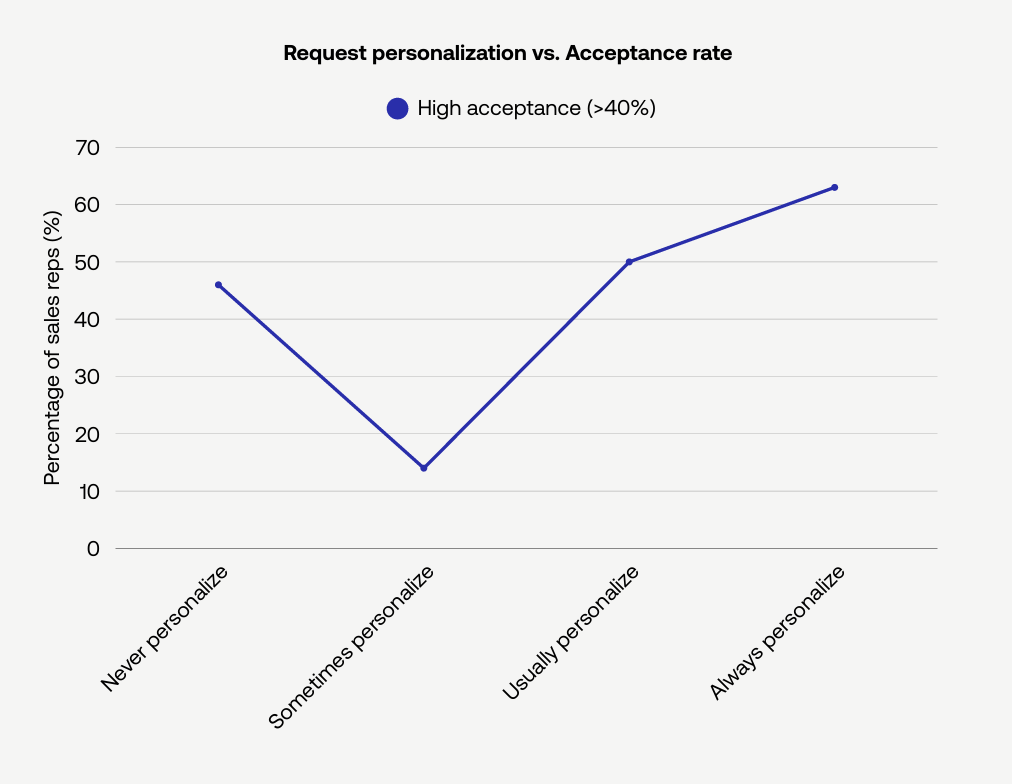
Scaling comes from contextual outreach—not raw volume.
This is where PhantomBuster’s AI-powered automations help you personalize at scale while keeping volume controlled.
How to use PhantomBuster to scale personalized outreach
Here’s a scalable LinkedIn outreach system using PhantomBuster’s AI-powered automations—built to deliver personalized outreach without overwhelming your prospects:
- Build a clean lead list: Use PhantomBuster’s LinkedIn Search Export or Sales Navigator Search Export automation to extract a list of profiles that match your ICP from searches. Apply advanced filters to pull data for specific roles, industries, and regions.
- Enrich the extracted data: Run PhantomBuster’s AI LinkedIn Profile Enricher automation to score and enrich these prospects based on their LinkedIn profiles. Now you have lead data that tells you why each person is worth contacting. When available, the automation includes publicly shared contact details. Always follow local laws (e.g., CAN-SPAM, GDPR) and platform terms when using contact information for outreach.
- Generate personalized messages at scale: Use PhantomBuster’s AI LinkedIn Message Writer automation to create a unique message for each lead. It reads their profile data and generates a personalized connection request that references the lead’s role or recent activity.
- Send reviewed, personalized messages in scheduled batches: Use PhantomBuster’s LinkedIn Outreach workflow to send connection requests and first messages from one place. Every prospect gets a message that references their role, context, or activity. For example: “Hi [Name], saw your post about [Topic]—we’re solving similar challenges in [Industry]. Worth connecting?”
Result:
You might send 40-80 connection requests per week instead of 400. But higher acceptance and response rates give you more conversations than bigger teams relying on mass outreach.
This is what true solo-operator scale looks like: Fewer actions. Better actions. Supported by AI and automation.
Heavy AI + automation users win more meetings, but there’s a caveat
The data spells it all out:
- 80% of sellers now use automation.
- 58% use AI.
- Heavy AI users are 3.5× more likely to book more than five meetings per month than those who never or rarely use it.
But here’s the catch: you don’t win just by adding more tools. You win by using automation while keeping the human element intact.
Use PhantomBuster as an AI-powered assistant that prepares data and drafts messages while you control strategy and approvals. You’re using it across the entire outreach process, right from capturing prospect details to making the first contact.
The automation is doing the bulk of the work: turning LinkedIn data into personalized messages that reference recent posts or role changes. But you’re still the one approving the pitch.
Review each request for 20–30 seconds. Add a 1–2 sentence opener that mentions a recent post, shared group, or role milestone before sending.
The key difference between manual outreach and using PhantomBuster is that the automation lets you handle 50–100 reviewed touchpoints per week without adding headcount.
Admin is where big teams waste their advantage, and where you can quietly win
Our report reveals where enterprise teams bleed time:
- 56% of sellers don’t have LinkedIn integrated with their CRM.
- 40% still update LinkedIn activity manually.
- Only 10% enjoy fully integrated LinkedIn–CRM workflows, and those are far more likely to book >5 meetings/month.
If you’re a one-person sales team, delegate the manual data entry part to PhantomBuster, and you’re already at an invisible advantage.
How to turn PhantomBuster into your invisible admin
Here’s how to use PhantomBuster so you never have to manually copy-paste LinkedIn data again:
- Extract and refresh your contact data automatically: Use PhantomBuster’s LinkedIn Profile Scraper automation or Sales Navigator List Export automation to extract profile fields to a CSV or Google Sheet for review.
- Sync straight into your CRM: Use PhantomBuster’s HubSpot Contact Sender or contact enrichment automations to push updated data into HubSpot or other CRMs like Pipedrive and Salesforce.
- Keep your database up-to-date: Automate job change tracking and contact refresh using PhantomBuster’s CRM Sync workflow (HubSpot + LinkedIn) to refresh contacts and job changes automatically.
Result:
- Your CRM stays clean and updated without manual work.
- Your pipeline reflects real LinkedIn behavior.
- Your outreach campaigns use fresh data instead of relying on guesswork.
Consistency beats sprints, and automation enables consistency
Our survey data shows:
- Most reps spend 3–10 hours/week on LinkedIn.
- 52% send fewer than 10 messages per week.
- Automation users are the only group consistently booking >5 meetings/month.
Consistent, smaller daily actions maintain acceptance rates and reduce detection risk—bursts do the opposite.
How to design a daily outreach rhythm that scales safely using PhantomBuster
Use PhantomBuster to build a drip system instead of doing short bursts of outreach:
- Connection requests:
- Start low (e.g., 10–20/day), ramp gradually based on acceptance rate and account age, and adjust if limits or policies change.
- Use PhantomBuster’s LinkedIn Outreach workflow to schedule a steady trickle of connection requests and first messages.
- Messages & follow-ups:
- Use PhantomBuster’s LinkedIn Outreach automation to send small waves of messages and follow-ups across the week.
- Think 3-4 touchpoints over 2-3 weeks, not “one big pitch and ghost.”
- Engagement:
- Use PhantomBuster’s Engagement workflow to auto-collect target posts and queue thoughtful comments for review before sending, then follow with a connection request.
This cadence looks more natural and avoids sudden spikes:
- You show up often.
- You engage, not just pitch.
- You build real connections, not just send links.
Following the above outreach system helps you achieve exactly that. PhantomBuster schedules actions over time to reduce spikes. While no tool can guarantee account safety, steady pacing and conservative limits help lower risk. Always follow LinkedIn’s terms.
Your PhantomBuster scaling system in one week
To make this less abstract, here’s how one-person teams can get from “no system” to “scaled” in about a week.
Day 1-2: Build your data foundation
- Define your ICP clearly (role, vertical, company size, geography).
- Use PhantomBuster’s LinkedIn Search Export or Sales Navigator Search Export automation to extract 200–400 prospects.
- Run PhantomBuster’s AI LinkedIn Profile Enricher automation to enrich the profiles with contact and other publicly available data, qualify, and score them.
Day 3-4: Wire in AI-powered, personalized outreach
- Run PhantomBuster’s AI LinkedIn Message Writer automation for your best leads to generate personalized messages for them.
- Use PhantomBuster’s LinkedIn Outreach workflow with the {ai_message} field. Review and approve each first message before queueing.
Day 5-7: Turn on the drip engine and invisible admin
- Start low (e.g., 10–20 connection requests per day, a small batch of messages), ramp gradually based on acceptance rate and account age.
- Automate CRM enrichment with PhantomBuster’s CRM sync automations.
- Add PhantomBuster’s engagement automations to warm key prospects via content.
With that, you have:
- Outreach campaigns that scale while maintaining a human touch.
- Admin work handled by the platform, not your brain.
- A clear view of your pipeline, powered by actual LinkedIn data.
That’s how “one-person teams” compete with enterprise sales in 2026. Start a 14-day free trial and build the 1-week workflow above—no extra headcount required.
FAQs about scaling outreach with PhantomBuster
What is the PhantomBuster scaling guide in practice?
The scaling guide is a system for using PhantomBuster’s LinkedIn automations for relevant outreach. You extract and enrich lead data from LinkedIn, generate personalized messages with AI, and run consistent outreach campaigns that a solo seller can manage.
How can a one-person team really compete with enterprise sales teams?
Use automation and AI to handle prospecting and outreach. Instead of hiring more SDRs, use PhantomBuster to handle manual work like list building, enrichment, messaging, and follow-ups at scale. You keep control of the strategy and tone while the system executes repetitive tasks.
Does scaling with PhantomBuster mean sending more generic templates?
No. PhantomBuster’s AI tools create personalized messages based on each lead’s LinkedIn profile or behavior. That means your outreach feels well-researched and contextual even when it’s done at scale. It doesn’t rely on sending the same template to each lead.
Is it safe to scale LinkedIn outreach per day with automation?
You can reduce risk by keeping human-like limits and avoiding spikes. No tool guarantees safety—follow LinkedIn’s terms and adjust conservatively. PhantomBuster helps you schedule steady pacing and respect conservative daily limits. While it can lower risk, it can’t guarantee account safety.
How fast can I set up a basic scaling system with PhantomBuster?
Most users can go from zero to a functional outreach system in about a week. Start by extracting leads, enriching them with AI, generating personalized messages, and then starting small, daily, automated outreach and follow-ups.